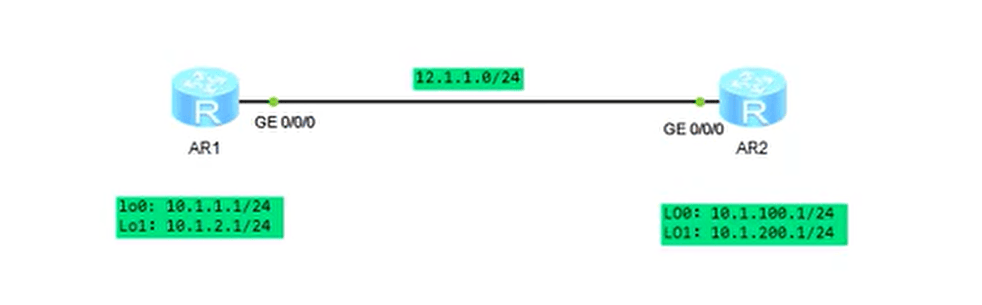
[Huawei]sysname R1 [R1]interface g0/0/0 [R1-GigabitEthernet0/0/0]ip add 12.1.1.1/24 # 注意这里不能写成/形式,IP和掩码要分开写 ^ Error: Wrong parameter found at '^' position. [R1-GigabitEthernet0/0/0]ip address 12.1.1.1 24 Mar 16 2024 22:04:13-08:00 R1 %%01IFNET/4/LINK_STATE(l)[1]:The line protocol IP on the interface GigabitEthernet0/0/0 has entered the UP state.
[R1-GigabitEthernet0/0/0]interface lo0 [R1-LoopBack0]ip address 10.1.1.0 24 # 10.1.1.0是一个网段地址,不能分配给设备或接口使用,是无效地址 Error: The specified IP address is invalid. [R1-LoopBack0]ip add 10.1.1.1 24 [R1-LoopBack0]lo1 ^ Error: Unrecognized command found at '^' position.
[R1]dis ip int brief *down: administratively down ^down: standby (l): loopback (s): spoofing The number of interface that is UP in Physical is 4 The number of interface that is DOWN in Physical is 1 The number of interface that is UP in Protocol is 4 The number of interface that is DOWN in Protocol is 1
Interface IP Address/Mask Physical Protocol GigabitEthernet0/0/0 12.1.1.1/24 up up GigabitEthernet0/0/1 unassigned down down LoopBack0 10.1.1.1/24 up up(s) LoopBack1 10.1.2.1/24 up up(s) NULL0 unassigned up up(s)
[R2]int g0/0/0 [R2-GigabitEthernet0/0/0]ip add 12.1.1.2 24 Mar 16 2024 22:12:38-08:00 R2 %%01IFNET/4/LINK_STATE(l)[0]:The line protocol IP on the interface GigabitEthernet0/0/0 has entered the UP state.
[R2-LoopBack0]int lo1 [R2-LoopBack1]ip add 10.1.200.1 24 [R2-LoopBack1]dis ip int brief *down: administratively down ^down: standby (l): loopback (s): spoofing The number of interface that is UP in Physical is 4 The number of interface that is DOWN in Physical is 1 The number of interface that is UP in Protocol is 4 The number of interface that is DOWN in Protocol is 1
Interface IP Address/Mask Physical Protocol GigabitEthernet0/0/0 12.1.1.2/24 up up GigabitEthernet0/0/1 unassigned down down LoopBack0 10.1.100.1/24 up up(s) LoopBack1 10.1.200.1/24 up up(s) NULL0 unassigned up up(s)
[R1]dis ip routing-table
Route Flags: R - relay, D - download to fib
------------------------------------------------------------------------------
Routing Tables: Public
         Destinations : 13       Routes : 13

Destination/Mask    Proto   Pre  Cost      Flags NextHop         Interface

       10.1.1.0/24  Direct  0    0           D   10.1.1.1        LoopBack0
       10.1.1.1/32  Direct  0    0           D   127.0.0.1       LoopBack0
     10.1.1.255/32  Direct  0    0           D   127.0.0.1       LoopBack0
       10.1.2.0/24  Direct  0    0           D   10.1.2.1        LoopBack1
       10.1.2.1/32  Direct  0    0           D   127.0.0.1       LoopBack1
     10.1.2.255/32  Direct  0    0           D   127.0.0.1       LoopBack1
       12.1.1.0/24  Direct  0    0           D   12.1.1.1        GigabitEthernet
0/0/0
       12.1.1.1/32  Direct  0    0           D   127.0.0.1       GigabitEthernet
0/0/0
     12.1.1.255/32  Direct  0    0           D   127.0.0.1       GigabitEthernet
0/0/0
      127.0.0.0/8   Direct  0    0           D   127.0.0.1       InLoopBack0
      127.0.0.1/32  Direct  0    0           D   127.0.0.1       InLoopBack0
127.255.255.255/32  Direct  0    0           D   127.0.0.1       InLoopBack0
255.255.255.255/32  Direct  0    0           D   127.0.0.1       InLoopBack0
R1尝试pingR2的环回路由ping 10.1.100.1不通,因为没有能够到达的路由
1
2
3
4
5
6
7
8
9
10
11
12
[R1]ping 10.1.100.1
  PING 10.1.100.1: 56  data bytes, press CTRL_C to break
    Request time out
    Request time out
    Request time out
    Request time out
    Request time out

  --- 10.1.100.1 ping statistics ---
    5 packet(s) transmitted
    0 packet(s) received
    100.00% packet loss
[R1]dis ip routing-table Route Flags: R - relay, D - download to fib ------------------------------------------------------------------------------ Routing Tables: Public Destinations : 14 Routes : 14
Destination/Mask Proto Pre Cost Flags NextHop Interface
10.0.0.0/8 RIP 100 1 D 12.1.1.2 GigabitEthernet0/0/0 # 此条路由即为RIP学习到的,能够到达R1的环回口 10.1.1.0/24 Direct 0 0 D 10.1.1.1 LoopBack0 10.1.1.1/32 Direct 0 0 D 127.0.0.1 LoopBack0 10.1.1.255/32 Direct 0 0 D 127.0.0.1 LoopBack0 10.1.2.0/24 Direct 0 0 D 10.1.2.1 LoopBack1 10.1.2.1/32 Direct 0 0 D 127.0.0.1 LoopBack1 10.1.2.255/32 Direct 0 0 D 127.0.0.1 LoopBack1 12.1.1.0/24 Direct 0 0 D 12.1.1.1 GigabitEthernet 0/0/0 12.1.1.1/32 Direct 0 0 D 127.0.0.1 GigabitEthernet 0/0/0 12.1.1.255/32 Direct 0 0 D 127.0.0.1 GigabitEthernet 0/0/0 127.0.0.0/8 Direct 0 0 D 127.0.0.1 InLoopBack0 127.0.0.1/32 Direct 0 0 D 127.0.0.1 InLoopBack0 127.255.255.255/32 Direct 0 0 D 127.0.0.1 InLoopBack0 255.255.255.255/32 Direct 0 0 D 127.0.0.1 InLoopBack0
[R2-rip-1]dis ip routing-table Route Flags: R - relay, D - download to fib ------------------------------------------------------------------------------ Routing Tables: Public Destinations : 14 Routes : 14
Destination/Mask Proto Pre Cost Flags NextHop Interface
10.0.0.0/8 RIP 100 1 D 12.1.1.1 GigabitEthernet0/0/0 # 此条路由即为RIP学习到的,能够到达R1的环回口 10.1.100.0/24 Direct 0 0 D 10.1.100.1 LoopBack0 10.1.100.1/32 Direct 0 0 D 127.0.0.1 LoopBack0 10.1.100.255/32 Direct 0 0 D 127.0.0.1 LoopBack0 10.1.200.0/24 Direct 0 0 D 10.1.200.1 LoopBack1 10.1.200.1/32 Direct 0 0 D 127.0.0.1 LoopBack1 10.1.200.255/32 Direct 0 0 D 127.0.0.1 LoopBack1 12.1.1.0/24 Direct 0 0 D 12.1.1.2 GigabitEthernet 0/0/0 12.1.1.2/32 Direct 0 0 D 127.0.0.1 GigabitEthernet 0/0/0 12.1.1.255/32 Direct 0 0 D 127.0.0.1 GigabitEthernet 0/0/0 127.0.0.0/8 Direct 0 0 D 127.0.0.1 InLoopBack0 127.0.0.1/32 Direct 0 0 D 127.0.0.1 InLoopBack0 127.255.255.255/32 Direct 0 0 D 127.0.0.1 InLoopBack0 255.255.255.255/32 Direct 0 0 D 127.0.0.1 InLoopBack0
测试RIP是否生效
ping对方环回口测试
1 2 3 4 5 6 7 8 9 10 11 12 13
[R1]ping 10.1.100.1 PING 10.1.100.1: 56 data bytes, press CTRL_C to break Reply from 10.1.100.1: bytes=56 Sequence=1 ttl=255 time=40 ms Reply from 10.1.100.1: bytes=56 Sequence=2 ttl=255 time=10 ms Reply from 10.1.100.1: bytes=56 Sequence=3 ttl=255 time=10 ms Reply from 10.1.100.1: bytes=56 Sequence=4 ttl=255 time=10 ms Reply from 10.1.100.1: bytes=56 Sequence=5 ttl=255 time=20 ms
--- 10.1.100.1 ping statistics --- 5 packet(s) transmitted 5 packet(s) received 0.00% packet loss round-trip min/avg/max = 10/18/40 ms
tracert测试
1 2 3 4 5 6 7
[R1]tracert 10.1.100.1

 traceroute to  10.1.100.1(10.1.100.1), max hops: 30 ,packet length: 40,press CT
RL_C to break

 1 12.1.1.2 20 ms  20 ms  20 ms   # 可见连接至10.1.100.1,经过了1跳,该跳为12.1.1.2
上述测试可见RIP生效
RIP基本配置过程
启动RIP
宣告网络
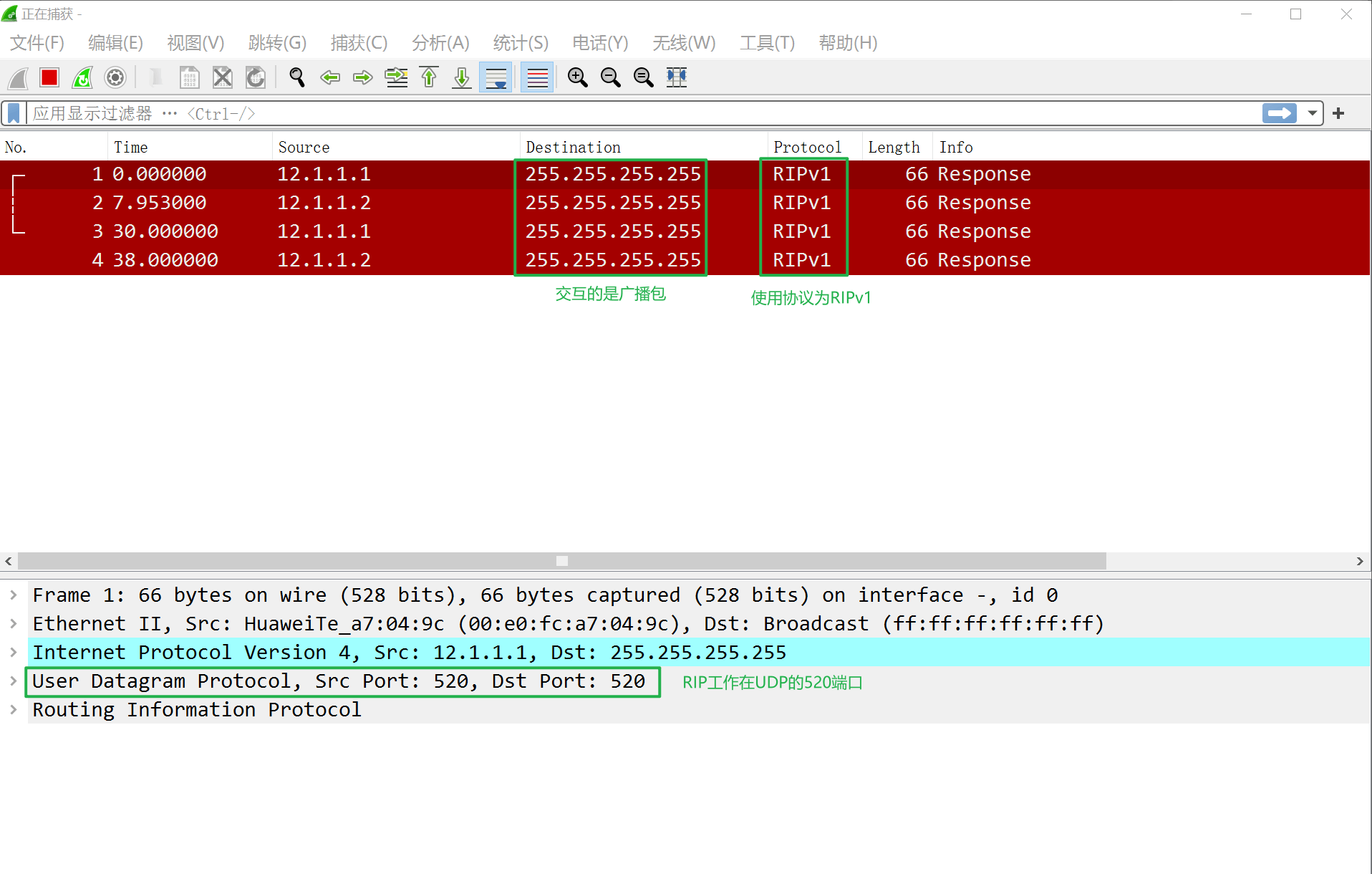
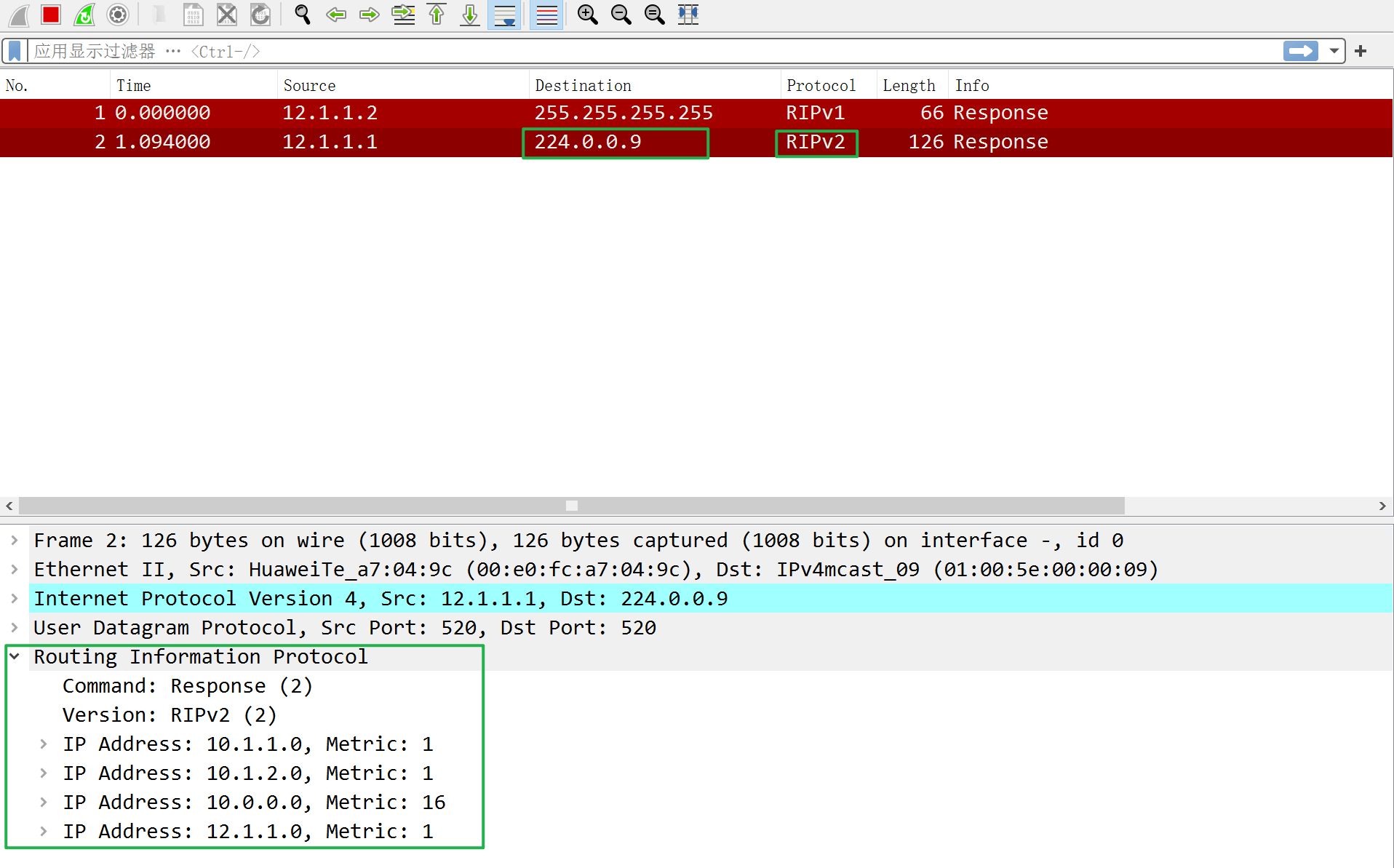
抓包分析RIP交互信息
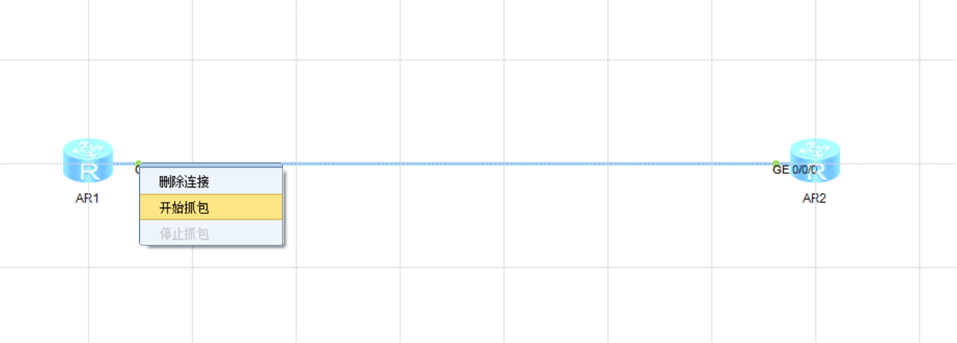
在R1的GE0/0/0接口处点击抓包
抓包结果
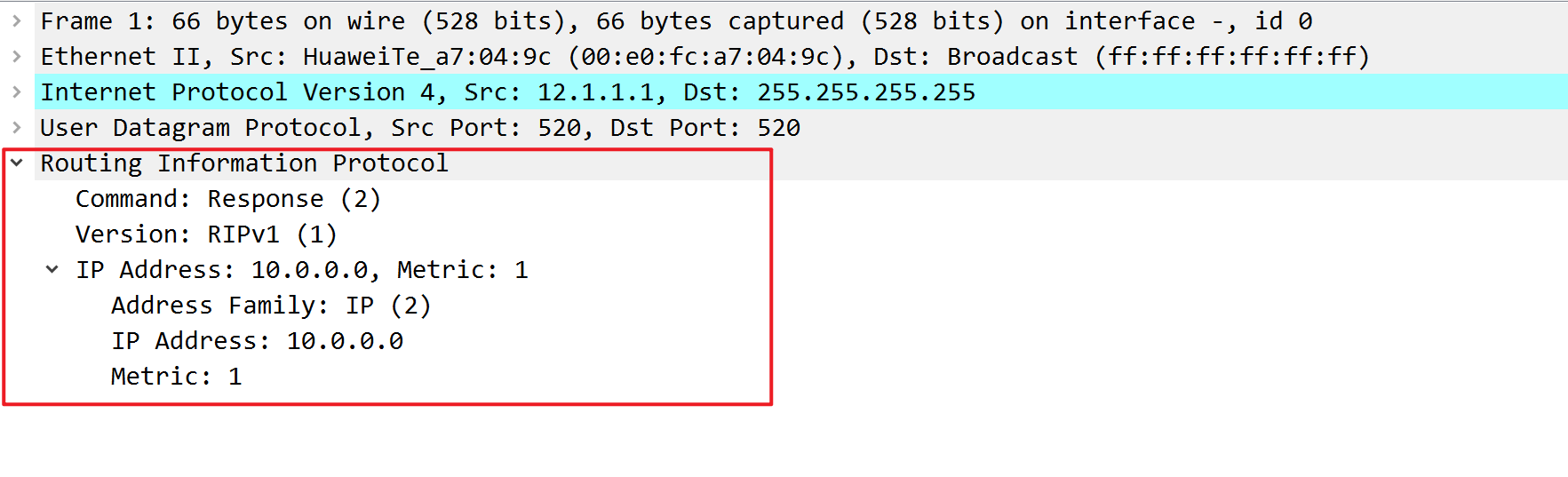
展开可见RIP协议交互的内容为路由信息
若将RIP版本改为RIPv2,如下命令
1
2
3
[R1-rip-1]version ?
  INTEGER<1-2>  Version of RIP process
[R1-rip-1]version 2