05 ACL配置

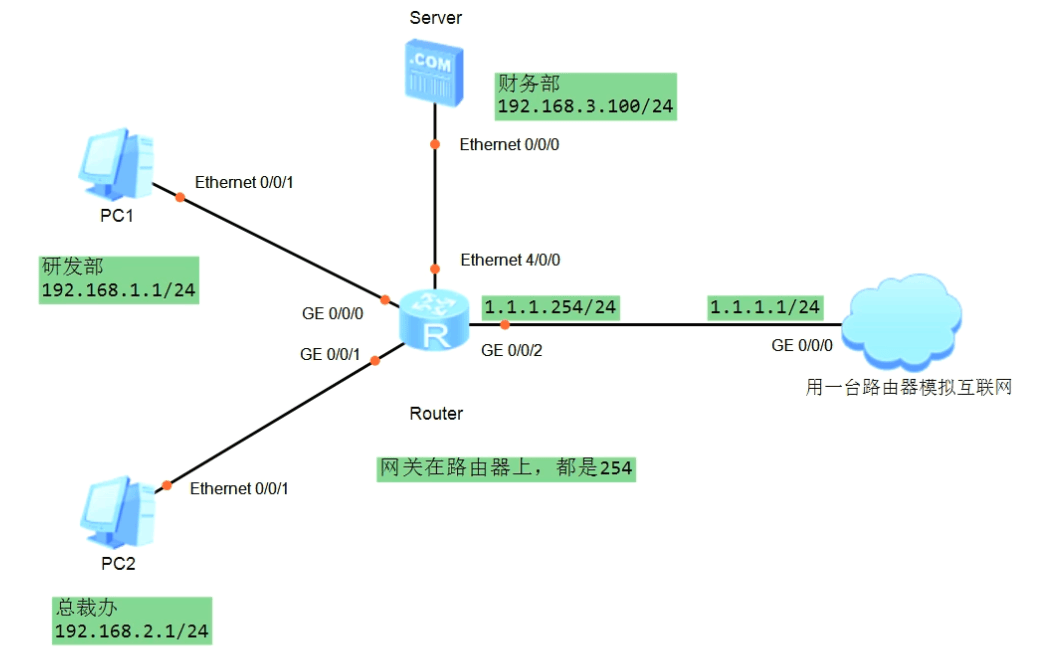
如图所示,公司为保证财务数据安全,禁止研发部门访问财务服务器,但总裁不受限制。
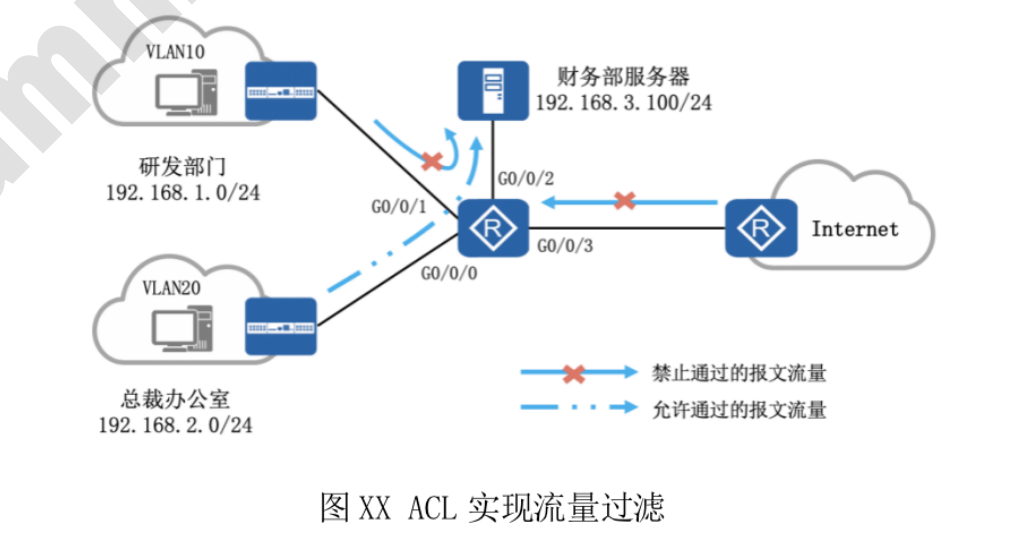
image-20250326232349432

分析:该网络环境中存在3组源地址,只有1组可以访问财务服务器

  • 研发部门IP:入站流量拒绝访问财务部服务器192.168.3.100/24

    • 即rule deny ip source 192.168.1.0 0.0.0.255 destination 192.168.3.100 0.0.0.255
  • 总裁办公室IP:入站流量可以访问财务部服务器192.168.3.100/24

    • 即rule permit source 192.168.2.0 0.0.0.255 destination 192.168.3.100 0.0.0.255
  • 互联网IP地址:入站流量拒绝访问财务部服务器192.168.3.100/24

    • 即rule deny ip source 0.0.0.0 255.255.255.255 destination 192.168.3.100 0.0.0.255作为最后一条?

    ACL配置实验

image-20250326233029462

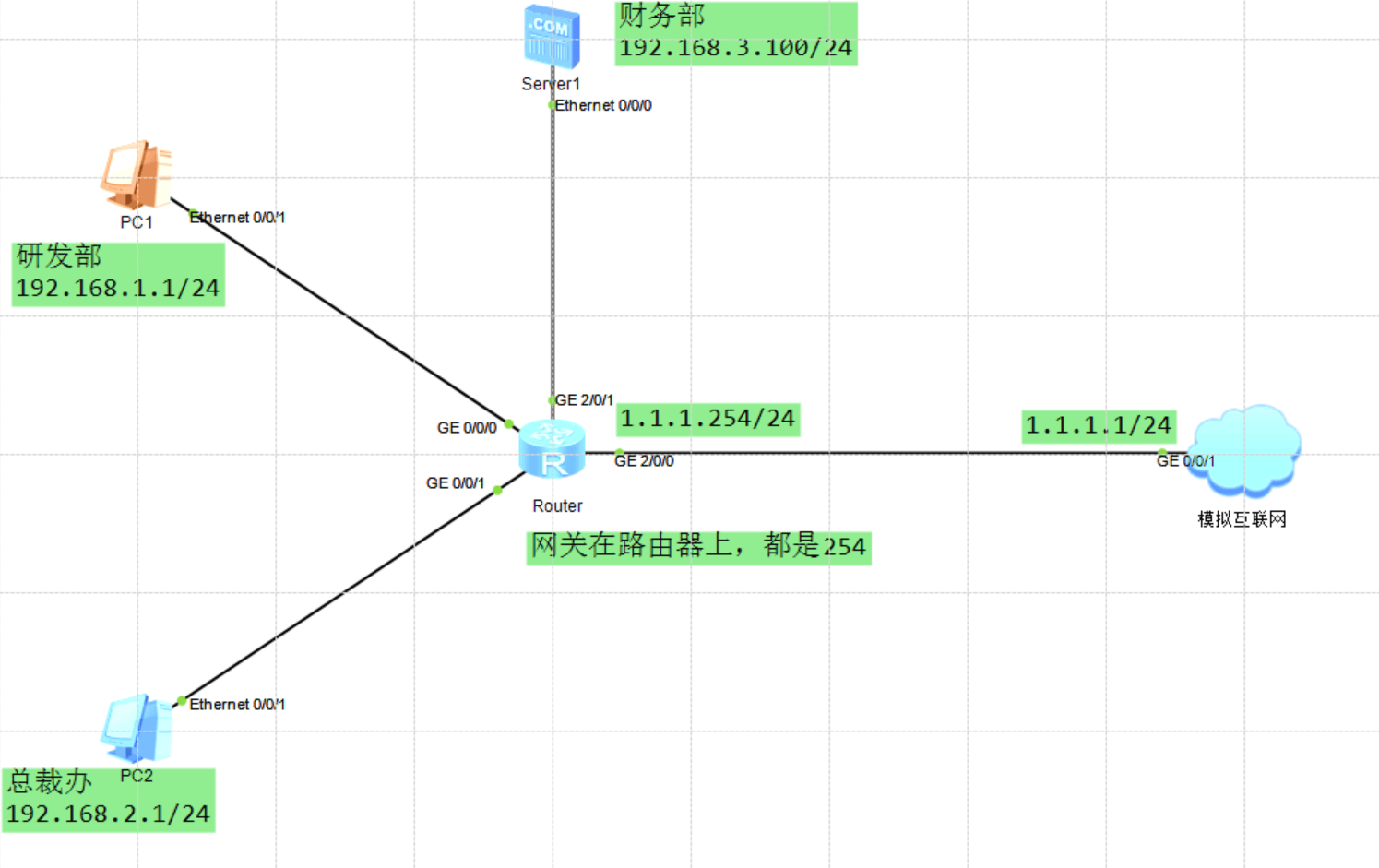
搭建拓扑

image-20250401204223192

配置IP地址

略

验证路由器IP地址配置

1
2
3
4
5
6
7
8
9
10
11
12
13
14
15
16
17
18
19
[Huawei]dis ip int brief
*down: administratively down
^down: standby
(l): loopback
(s): spoofing
The number of interface that is UP in Physical is 5
The number of interface that is DOWN in Physical is 2
The number of interface that is UP in Protocol is 5
The number of interface that is DOWN in Protocol is 2

Interface IP Address/Mask Physical Protocol
GigabitEthernet0/0/0 192.168.1.254/24 up up
GigabitEthernet0/0/1 192.168.2.254/24 up up
GigabitEthernet2/0/0 1.1.1.254/24 up up
GigabitEthernet2/0/1 192.168.3.254/24 up up
GigabitEthernet2/0/2 unassigned down down
GigabitEthernet2/0/3 unassigned down down
NULL0 unassigned up up(s)
[Huawei]

此时使用PC去ping 1.1.1.1无法ping通,因为1.1.1.1上没有回程路由。此时可以在1.1.1.1上写一条默认路由指回1.1.1.254/24,再次测试能够ping通

配置ACL

创建ACL

1
[Huawei]acl 3000

拒绝研发部访问财务服务器

1
[Huawei-acl-adv-3000]rule 10 deny ip source 192.168.1.1 0.0.0.255 destination 192.168.3.100 0.0.0.0

允许总裁办访问财务服务器

1
[Huawei-acl-adv-3000]rule 20 permit ip source 192.168.2.1 0.0.0.255 destination  192.168.3.100 0.0.0.0

禁止其他任何流量访问财务服务器

1
[Huawei-acl-adv-3000]rule 30 deny ip source any destination 192.168.3.100 0.0.0.0

验证ACL

1
2
3
4
5
6
[Huawei]dis acl 3000
Advanced ACL 3000, 3 rules
Acl's step is 5
rule 10 deny ip source 192.168.1.0 0.0.0.255 destination 192.168.3.100 0
rule 20 permit ip source 192.168.2.0 0.0.0.255 destination 192.168.3.100 0
rule 30 deny ip destination 192.168.3.100 0

在接口上应用上述ACL

可以在各个源IP设备的入接口绑定ACL,但是需要绑定多次;也可以在目的IP设备的出接口绑定ACL,只需要绑定一次

1
2
3
4
5
6
7
8
9
[Huawei]interface GigabitEthernet 2/0/1
[Huawei-GigabitEthernet2/0/1]dis this
[V200R003C00]
#
interface GigabitEthernet2/0/1
ip address 192.168.3.254 255.255.255.0
#
return
[Huawei-GigabitEthernet2/0/1]traffic-filter outbound acl 3000

测试ACL是否生效

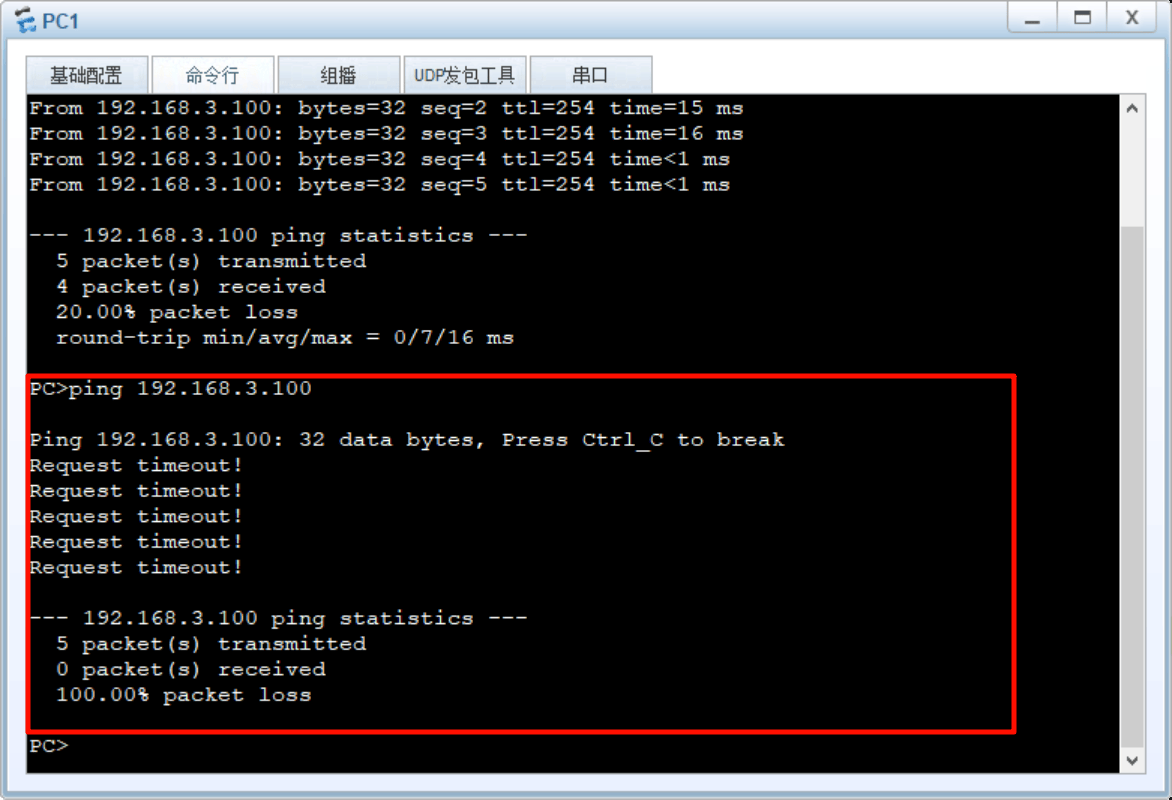
测试PC1能否访问财务服务器:不能

image-20250401205627977

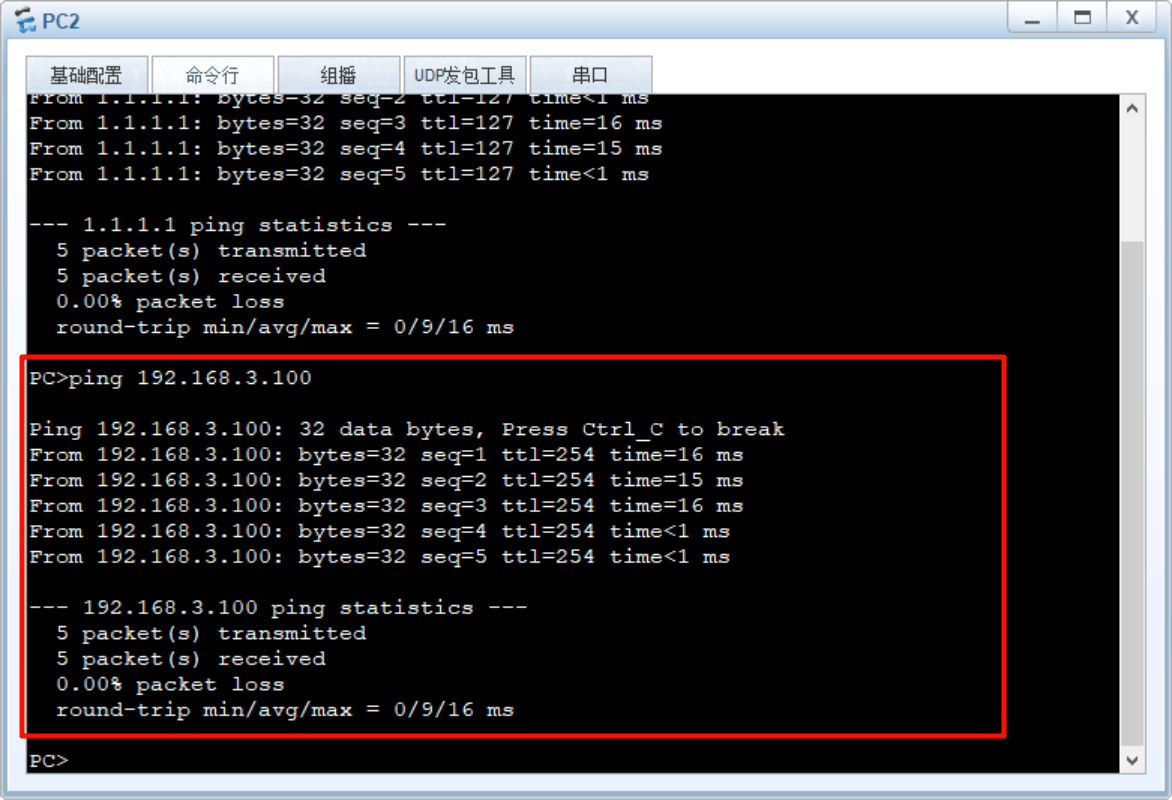
测试PC2能否访问财务服务器:能

image-20250401205659832

模拟互联网亦不能访问财务服务器

综上,通过ACL实现访问控制

ensp实验

参考博客提前配置:ENSP桥接电脑物理网卡,实现web管理

站内搜索

没有找到内容!